Ramblings of General Geekery

Announcing PieCrust For Vim

After my Mercurial plugin for Vim, Lawrencium, here’s my second official Vim plugin! You won’t be surprised to know it’s a PieCrust plugin which adds a few commands that make it easier to work on your website. It’s of course named “vim-piecrust” and is available on BitBucket.

Old Time Tropical Pie

Well, actually, at the moment it’s only got on command: Pcedit. You will need the latest PieCrust to make it work. When you do, typing :Pcedit something<tab> in Vim will bring an autocomplete list that contains any page, post or template that contains “something” in its filename. It makes it very quick to edit files in your website.

I’ll add more commands in the future of course.


Piecrust 0.6.0

I’ve been focusing a lot of my free time on PieCrust these days – to the point where my other projects are suffering from it – but I’m getting close to a possible 1.0 release, which is good! But in the meantime, here’s version 0.6.0, which is not very big but still has some goodness in it.

Rhubarb Apple Pie

You can go read the newly created CHANGELOG file for the whole list of changes, new features and bug fixes, but here are the most important ones, right after the break.

  • Twig and LessPHP have been updated to their latest version.
  • Added a chef prepare command to quickly create pages and posts files. For example, if you type chef prepare post my-new-whipped-cream-recipe, Chef will create a post file at the appropriate location (depending on your posts file-system setting) for the current date and time.
  • Added a wordcount Twig filter which does pretty much what the name says, although the count is likely to be off by a few words since the counting algorithm is extremely naive and is run before Markdown or Textile formatting. Still, I think it’s a good indicator of how long the article is – maybe I’ll revisit the algorithm if people express interest in a more accurate one (although it could quickly become complex if you consider internationalization).
  • Added a --nocache parameter to Chef if caching should be disabled for the current command.
  • Chef’s --debug parameter used to also kinda change how PieCrust is running. Not anymore: it’s now just changing the verbosity of Chef, just like --quiet.

Big thanks to the people who reported bugs and helped me fix them.


Navigation menu in PieCrust

Here’s another post in the PieCrust cookbook series, this time focusing on a classic web-design pattern: the navigation menu.

Menu

It’s really just a bunch of links that you can put somewhere around each page’s content, but the trick here is to tell the user which page he’s currently on. This is pretty easy to do using Twig macros and the data exposed by PieCrust, assuming of course you’re using PieCrust’s default template engine.

Let’s start by building a simple layout. I skipped the parts that are not relevant:

    <!doctype html>
    <html>
    <body>
        <div id="content">
            {{ content|raw }}
        </div>
        <div id="navigation">
            <ul>
                <li><a href="{{ pcurl('') }}">Home</a></li>
                <li><a href="{{ pcurl('something/foo') }}">Foo!</a></li>
                <li><a href="{{ pcurl('about') }}">About</a></li>
                <li><a href="{{ pcurl('contact') }}">Contact</a></li>
            </ul>
        </div>
    </body>
    </html>

This is a pretty standard PieCrust layout, but we want the user to know which one of those 4 navigation links is the current page. Here’s a way to do it.

Step 1: Write the macro

You can write a macro that, depending on the current page’s “slug” (the page’s URL name1), prints either a link or just some text with the active class.

{% macro nav_entry(slug, current, label) %}
{% spaceless %}
{% if current == slug %}
<span class="active">{{ label }}</span>
{% else %}
<a href="{{ pcurl(slug) }}">{{ label }}</a>
{% endif %}
{% endspaceless %}
{% endmacro %}

Note the use of the spaceless tag to make sure we don’t have ugly carriage returns and spaces in our resulting markup (we want everything on one line). This is not required – it just makes the HTML prettier.

Step 2: Import the macro in the layout

You can either put the above macro in a separate file (say, _content/templates/nav_macros.html), or at the beginning of your layout file – it depends on whether you want to reuse those macros elsewhere, and whether you want to keep your layout markup cleaner.

If you put the macro in a separate file, you’ll need to import it in your layout file with Twig’s import tag:

{% import "nav_macros.html" as nav %}

Here, we imported in the nav namespace, so you can call your macro with nav.nav_entry.

If you put the macro right there in the layout file, you have to prefix the calls with _self like so: _self.nav_entry.

For more information, see the Twig documentation on macros.

Now you can replace the navigation links with calls to the macro:

    <div id="navigation">
        <ul>
            <li>{{ nav.nav_entry('', page.slug, 'Home') }}</li>
            <li>{{ nav.nav_entry('something/foo', page.slug, 'Foo!') }}</li>
            <li>{{ nav.nav_entry('about', page.slug, 'About') }}</li>
            <li>{{ nav.nav_entry('contact', page.slug, 'Contact') }}</li>
        </ul>
    </div>

Unfortunately, you need to pass page.slug to the macro every time because the macro doesn’t have access to the current context as far as I can tell.

Add a bunch of CSS styles that will handle the active class and voilà, you’ve got a nice navigation menu.

I’ve slapped together a little demo website here so you can see it in action.


  1. Strictly speaking, PieCrust’s definition of “slug” is not quite correct since it includes the root-relative folders that contain the resource, but… well… whatever. ↩︎


PieCrust 0.4.0

The holidays have not just been a time spent with the family eating unhealthy amounts of equally unhealthy food: it was also a time of great changes for PieCrust. So much, actually, that I bumped the version number up twice. This is not just because those changes are pretty significant but also because they break things a bit.

Apple pie

Plugins!

Yes, at last, PieCrust officially supports plugins! The code was already somewhat designed as such, but there was no easy way to write, install and manage plugins before.

Now, it’s pretty simple: each plugin is a bunch of files contained in a directory located in the _content/plugins directory. If you want to share plugins between several websites, you can specify additional directories in which PieCrust will look in a similar way you specify additional template directories: you add it to the site/plugins_dirs configuration setting.

For more information, read the official documentation on plugins.

To celebrate the occasion, I also did some cleanup of the default PieCrust install: the PhamlP features (the Haml template engine and formatter, along with the Sass processor) and the Dwoo template engine have been removed altogether from PieCrust, and moved into their own plugins. Dwoo didn’t add much to the plate that Twig, the default template engine, didn’t have already, and PhamlP is just not working very well (it’s good enough for simple cases, but breaks down if you give it heavier things like the Compass framework files).

Two more plugins have been written:

The new Chef

Chef, the PieCrust command line executable, has changed. For starters, it now behaves like git or hg, in the sense that it knows if it is being run from a directory within a PieCrust website (it will look for a _content/config.yml file somewhere up in the current hierarchy). This makes it a lot easier to use because there’s barely ever a need to specify the root directory of the website it should act upon. In turn, it streamlines the usage of most commands, making them more natural. However, it means the old parameters and options won’t work anymore – you will get an error instead.

With the new chef also comes a few new commands:

  • root: returns the root directory of the website.
  • plugins: shows a list of the plugins loaded for the current website.
  • stats: shows some stats about the website.
  • tags: lists the tags used in the website.
  • categories: lists the categories used in the website.

The nice thing about the new chef is that, coupled with the new plugin architecture, it knows about site-specific plugins that could expose new commands. This is very similar to how Mercurial lets you use extensions on a per-repository basis.

That’s about it! I hope you’ll be happy with this major milestone. I’ll merge those changes into the stable branch within a week unless something goes wrong. As always, use the BitBucket or GitHub issue trackers to notify me of the many bugs I likely introduced.


PieCrust 0.2.0

It’s been a busy few weeks, both on PieCrust and on a couple other projects. I pushed versions 0.2.0 through 0.2.3 and didn’t even have time to write about it until now! Here are some details about what’s new and what’s changed.

Hot Pie

New Stuff

  • Pagination: that was the main focus for this version. On the pagination object you’ll find a whole bunch of new properties and functions, like the number of posts actually on the page, the total number of posts and pages for the current filter, or the indices for the previous and next pages. This will let you build layouts like Yahoo’s pagination patterns.

    There are also a few methods you can call to change the pagination filters for the current page, like skip(), limit(), with_tag() or in_category(). This is pretty handy for special pages that need to list a specific set of articles.

    Last, but not least, the complete set of categories and tags are exposed as (wait for it) categories and tags. You can iterate on them to get their name and their post count. This lets you build things like tag clouds and archive listings. This one may change a bit in the future, however, since I’m not too happy yet about how it works. Feedback is welcome!

    Use the template data debugging window to inspect the pagination object and see what you can use.

  • Twig Filters: There’s a new Twig filter called nocache, which appends a timestamp to an URL. This is useful for preventing cache issues on resources like CSS files. You can of course combine it with pcurl: {{ pcurl('styles/default.css')|nocache }}

  • WordPress Import: The WordPress import was broken for a while, but it’s been rewritten completely so it’s as good as new. Also, it now not only supports importing from an XML file exported from WordPress’ dashboard, but also importing directly from WordPress’ MySQL database, which is faster in some cases, and necessary in others (like when your blog was hosted on wordpress.com.

Changed Stuff

  • The skip_patterns configuration setting for excluding files from a bake is now evaluated against the root-relative paths instead of the filenames. This means that if your pattern was a regular expression like ^_, it will no longer exclude any file or folder starting with an underscore – instead, it will only exclude any file or folder starting with an underscore at the root of the website. It unfortunately makes some scenarios a bit harder to do, but the point is to make brand new scenarios possible.

  • The chef init command, which creates a new empty website, doesn’t add files for Apache or IIS hosting anymore. You can create them by passing the --apache or --iis parameters.

  • Old bugs have been fixed, new bugs have been written!

Next Up

The next tasks involve actually updating the documentation on the PieCrust website, and working on version 0.3.x, which will feature support for user plugins (effectively making it easier to add formatters, template engines and bake processors).

As usual, grab the latest version of PieCrust from the BitBucket or GitHub repositories.


New PieCrust debug window

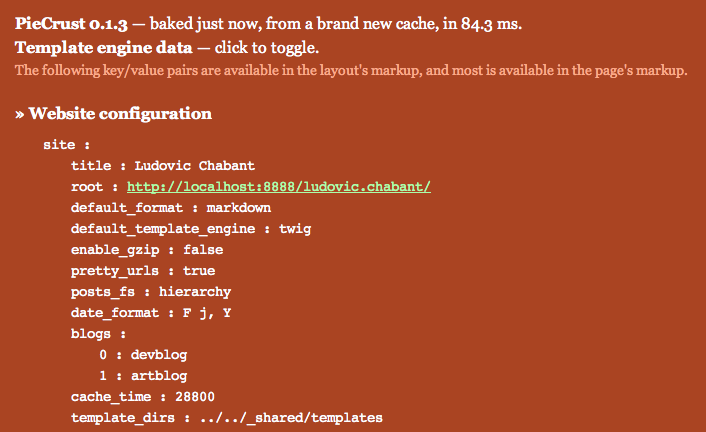
There’s a new experimental feature (meaning: only in the new default branch) that makes the debug window more useful. The debug window is a little known PieCrust feature that used to only show you some caching and performance information on the bottom right corner of your website. But now you’ll notice a second line about “template engine data”:

If you click on it, you will see all the template variables exposed for the page you’re currently viewing.

Not only is it useful for troubleshooting things, but it’s also a great learning tool. Tell me what you think!


PieCrust code changes

There’s been some big changes in the PieCrust codebase recently: some refactoring to make unit-testing easier, the creation of a second branch, and the creation of a satellite repository for the application’s code alone.

You won’t care much about the first one (the refactoring) although you may have to expect a whole bunch of new bugs, which will hopefully be easy to test and fix since the whole point of this refactoring is to make testing easier. The other changes are important, however:

  • There’s a new stable branch which will, well, be kept as stable as possible. This means that new features introduced in the default branch will stay there for a little while until they’re merged into stable. This branching policy is simple yet quite common, as explained by Steve Losh.

  • The "PieCrust Sample" repository now contains the partial history of the main repository. Yeah, I’ve decided to read the Mercurial documentation and found that the hg convert command is pretty useful in this case.

  • The new "PieCrust App" repository contains only the PieCrust app’s code in the root directory. This is useful if you want to include it as a sub-repository of your website’s repository – e.g. in a _piecrust directory. This way, you don’t need mix the PieCrust files with your own, and you can easily update by pulling the sub-repo. This one is also mirrored on GitHub in case you don’t want a Mercurial sub-repo for some reason.


Article drafts in PieCrust

A common feature of a blog engine is to let the user work on an article for a while before actually publishing it. Thanks to pagination filtering, it’s pretty easy to do in PieCrust.

All you have to do is add the following to your blog’s home page’s configuration header:

posts_filters:
    not:
        has_tags: draft

This will skip any post that has the draft tag.

You will probably need to add some similar filtering to other pages such as the _tag or _category pages.

Edit: as Keilaron mentioned in the comment, you can’t modify the filters on a tag or category listing page, because their filters are preset to, well, filtering posts with a specific tag or category. This means that, unfortunately, you should not actually tag/categorize your drafts.

Edit 2: as of PieCrust 1.0, it’s possible to use a posts_filters on the _tag or _category pages, so it’s all good!


Fresh PieCrust available

I just pushed version 0.1.2 of PieCrust, the lovely static website generator that powers this blog, and most of my other websites.

Pie, anyone?

Yep, the version was bumped from 0.0.4 to 0.1.2. The main reason is that I very heavily refactored the code to make it a lot more readable and maintanable. This also means a whole new batch of bugs are lurking in the dark!

The main change for users is that there’s no _chef directory anymore. It’s all a lot cleaner, with everything living in _piecrust. Just be sure to delete your old directories before getting the new ones, so you don’t have old junk lying around. This also means that you need to (slightly) change your bootstraping code for running PieCrust. If you didn’t customize anything, you can just grab the new index.php from the sample website and overwrite your own. If not, you may want to check out the updated documentation on PieCrust bootstraping.

Among the new features, you’ll find:

If you want to see what’s planned in the future, there’s also a brand new public
Trello project board
.

Finally, check out the slightly redesigned and reorganized PieCrust website!


New PieCrust features

After several release candidates1 , I finally updated PieCrust to version 0.0.4.
Pie

There are quite a few nice new things in it:

  • pattern-based ability to skip files from baking
  • pagination filtering
  • multi-tag pages
  • multi-blog support
  • various bug fixes and optimizations

More details after the break.

“Skip patterns” for the baker

As part of the ongoing PieCrust cookbook, I blogged about previewing a baked site in IIS or Apache. Back then I mentioned how just one piece was missing to make it simpler: the ability to specify a pattern for files to exclude from baking. Well, I did just that.

Now, in your site configuration, you can specify an array of skip_patterns in the baker category. See the documentation for more info.

Pagination filtering

If you have a page that displays a list of posts, you can now do some custom filtering for those posts. In that page’s configuration header, add a section called posts_filters like such:

posts_filters:
    has_tags: piecrust
    has_tags: cookbook

This will only list blog posts that have both the “piecrust” and “cookbook” tags. This is useful for example if you only want to display important annoucements on your homepage, and have a separate “news” page with all the posts.

For more info, check out the documentation on pagination.

Multi-tag pages

Edit: in PieCrust 1.0RC and above, the multi-tags syntax changed!

PieCrust can generate tag pages, like for example the page listing all my posts related to PieCrust. However, if you want to generate a page that shows all the posts related to the PieCrust cookbook, you would have to specify two tags ("piecrust" and “cookbook”)… that is, assuming you really didn’t want to create specific “piecrust-cookbook” tag.

This is now possible by separating tags with a / like so: cookbook/piecrust. Try it!

If you’re using Twig, the default template engine, or Dwoo, one of the optional ones, it means you can use the pctagurl like so:

{{ pctagurl('cookbook/piecrust') }}

The only limitation is when you bake your site: only tag combinations that you insert with the Twig or Dwoo pctagurl functions will be baked. Since you should always insert links with the pc* functions, it should be all right, but you may want to link to a tag combination from outside your website. If that’s the case, you can specify custom tag combinations to be baked. Check the documentation for more details.

Multi-blog support

PieCrust now also supports multiple blogs in the same website. I debated with myself for quite a long time before adding this feature. On one hand, it felt a bit too complicated for a system that’s supposed to feel simple and natural, but on the other hand, well, I needed it. And after much pondering, I figured out a way to make it rather simple to the user. I think. Maybe. Hopefully.

Anyway, if you have a single-blog site, you don’t have to change anything (yay!). If you want more than one blog… go check out the documentation on multi-blog sites!

Other changes

Other changes include a more clever cache validation mechanism, some new debugging features, and many bug fixes.

  1. a.k.a: Ludovic doesn’t test his shit enough before applying a version tag. ↩︎