PieCrust 2.0rc1 is now out! The last piece of the puzzle (or should I say the pie?), page generators, is now in place.
You can run pip install piecrust --pre -U to update from PyPi, or grab it from BitBucket or GitHub.
More details after the break.
Page generators
The big new feature in this release are page generators. They’re basically a generalization of the previous taxonomy feature, which used to let you define taxonomies (tags, categories, etc) to classify your pages, and then PieCrust would generate one page for each term that you use (e.g. each tag would get its own page).
But the concept of generating pages based on what’s in the “normal” pages is also useful for other things… for instance, blog archives – assuming you don’t want all your archives to be in one page, like you had to do before. Instead, you could have one page per year, for instance.
That’s exactly what PieCrust 2.0rc1 ships with – a yearly blog archive generator, in addition to the taxonomy system. By default, if you create a pages/_year.md page, it will start creating yearly archive pages based on it.
Page generators benefit from the same kind of parallelism and caching that all other page sources have during a bake, so it should be as fast as before.
PieCrust 2.0 beta 5 is now live on PyPi, so you can go ahead and pip install --pre piecrust -U to get it.
The 2 big new features in that release are the last reasons I switched to Python for PieCrust 2 after packaging and multi-core support: better ways to launch and manage sub-processes. This lets me do:
Publishing support, because baking your site is only the beginning, and you actually need to upload that stuff somewhere.
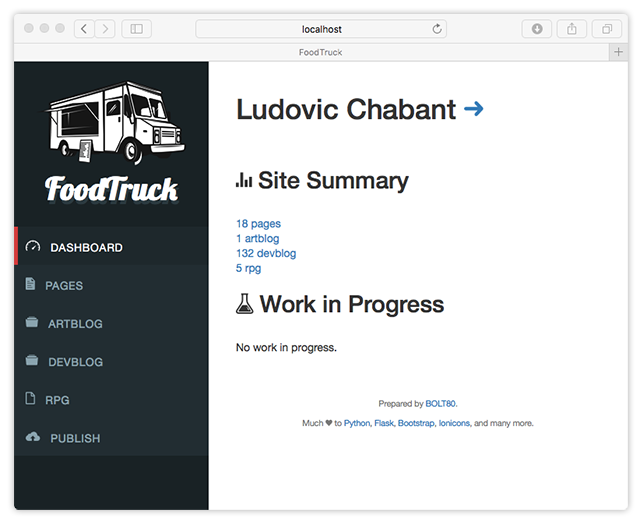
“FoodTruck”, an optional administration panel to work on your site(s) the same way you would with a traditional system like WordPress.
More after the break.
Publishing
A lot of static website generators out there already have this concept of “publishing” your website, i.e. not only bake it, but also upload it to some FTP server, rsync it, push it to GitHub pages or an S3 bucket or whatever. Support varies from system to system.
Well now PieCrust at least has the basic infrastructure to support the same kind of feature – something I have been delaying for too long! There’s only support for arbitrary shell commands and rsync, but I’m hoping more publish targets will come soon.
I’ve wanted to do this for a while now, but had to figure out the right way to do it, which is to provide a web administration dashboard that you can use to work on your website.
Now I know what you’re thinking. Isn’t the whole point of static website generators that you keep everything simple as text files, and you use your favorite (and most productive) text editor? Well, of course!
But the reality is that you need an optional adminstration panel for 2 reasons:
First, you want to attract newbies and non-technical people to the dark side of flat-file CMSes. Making it attractive and usable to them will hopefully be one of the gateways for them to become more technical, and in turn maybe participate in this wonderful melting pot that is the open-source web.
Second, have you seen the average blogging frequency of a static website user? Have you seen mine1? I believe that it’s a consequence of the price we pay in terms of practicality: to post something new, we have to get to a computer that has our site repo, and some way to bake and upload that to our web server. But it doesn’t have to be that way. You could also have an administration panel running on your server, so that you can also quickly post on the move, from your phone, and it would take care of baking and publishing for you in the background.
As I was writing FoodTruck, a couple static website generators appeared with an administration panel – most famously Lektor, by Python superstar “mitsuhiko”2. As far as I can tell, these are mostly geared towards the first reason, i.e. provide a nicer, user-friendly way to edit your website.
Hopefully, they start moving towards the second reason too. That second reason is actually the heart of FoodTruck, although there’s still a lot of work to get there. Consider:
The administration panel needs to run some heavy process (baking and publishing) from a web page.
The administration panel needs to be able to submit to your Git/Hg/etc. repository so you can then pull the edits you made on the go once you get back home.
The administration panel needs to be secure, obviously. And I don’t know shit about web security.
It can do most of that already, but not well enough yet for me to be comfortable with letting you all run this code on a public web server… so stay tuned for the next few releases, and check out the documentation on the administration panel for more info.
Ironically enough, my blogging frequency went down around the time I started writing my own blog system… although that’s slightly misleading, because that’s also around the time I started having kids, and coincidentally figured I should focus more on fewer home projects in order to actually ship them, instead of always leaving them in a half-finished state. ↩︎
There go my chances of having the most popular Python static website generator! ↩︎
I originally wrote Wikked as a single page app because, well, I wanted to have a little fun and learn something new. And it worked (I did have fun learning Javascript past the “copy JQuery snippets from the internet” phase), but it didn’t really work (it made testing and deploying unnecessarily harder). It could have also been argued that making this an SPA was overkill… at least, it did bother me a bit, since I tend to prefer simpler/old-school technologies.
Anyway, I embarked on a giant refactor of the code base to reimplement the front-end using a more classic architecture, and the last couple versions of Wikked are the result of this transition. You shouldn’t see anything new, besides a few less old bugs, a few new bugs, and an overall more stable experience.
New documentation
In the process, I also got rid of the old documentation page I had on BOLT80, and made a proper versioned documentation website, just like with PieCrust. That website is part of the Wikked codebase so you can easily send patches for it… and of course, it’s made with PieCrust.
You can check it out at the same place as before on BOLT80. It’s still a work in progress design-wise – it’s meant to look similar to a Wikked-powered wiki, but it still lacks a bit of graphics and other stuff to make it look less sterile.
Next steps
As always after I spend a few months doing some giant task with the limited free time that I have, I need to get back to my other projects and reply to the various bug reports and pull requests I haven’t replied to in weeks. Then it’s back to business as usual, I hope… at least unless I get into another big refactor.
PieCrust news – and this blog – have been pretty quiet for the past couple months, and that’s because I’ve been busy working on PieCrust 2 performance.
TL;DR: PieCrust 2 now runs in multiple cores, which speeds up the baking process quite a bit. Update your repositories, or grab the latest version from Pypi!
It had to happen eventually, but PieCrust 1.x is now officially deprecated. It was deprecated more or less unofficially before, as you can see from the lack of activity on the repository, but, well, here it is.
The PieCrust 2 help pages are now showing up by default at the official URL, and that’s where I’ll be focusing from now on.
If you want to upgrade your existing 1.x website to 2.0, you can follow the installation and upgrade instructions. And of course, please contact me if you have issues or feedback!
I’ve been quite silent for the past few weeks because I’ve been mostly working on the PieCrust 2 documentation website – a lot of time spent writing stuff, trying out different layouts, figuring out how to organize the information, and coding the infrastructure tools that will generate separate documentations for each release.
Now at least I’ve got half of something to show, in case some of you want to provide feeback or – gasp – help! Head over to the PieCrust 2 documentation preview to see it in all its work-in-progress glory!
At this point, it’s only about a third done, so there’s probably another few weeks of work. But it’s interesting how writing documentation forces you to polish a product. This is not new – it’s really a variation of README-driven development – but that’s why it’s taking a long time: a good chunk of the documentation writing time is looking at what I just wrote, thinking that it’s completely stupid, writing what it should be like, and then fixing the code so it does exactly that.
Now that you know about PieCrust 2 and you’ve upgraded your website, it’s time to look at the really new features. Today we’ll talk about the 2 ones that I think are most important: the new content model, and the new pagination model.
(this post is going to be a bit long so here’s something to keep you hungry)
Sources, routes, and taxonomies
In PieCrust 1, like in most other static website generators, the way content was defined was quite rigid: you could have pages, and you could have blog posts. PieCrust did a few extra things, like letting you have multiple blogs, each with its collection of posts, but that was it.
The only way to have a specific set of pages, different from other pages, was to use page metadata and filtering (say, filter pages where type is recipe to get all recipes), but that didn’t translate to a good file-system organization, required remembering to tag things correctly, and required to use the inverse filter to get the other pages. You also couldn’t have a different URL format for all recipe pages, as compared to normal pages.
Enter PieCrust 2, where all the content is, under the hood, defined with sources, routes, and taxonomies. Those are generated for you to something equivalent to PieCrust 1 content if you don’t define them, but you can override that for totally custom content.
Sources
Sources are where pages come from. Two source types you already know (if you used PieCrust 1 before) are:
the “simple” page source, where pages are found recursively under a given directory, and their relative path translates to their relative URL.
one of the “blog” page sources, where pages are found in a closely structured directory, and both the date and “slug” of the post are defined by the filename. So in the case of, say, the flat post source, all posts are files named YYYY-MM-DD_foo-bar.md directly under the posts/ directory.
Because a site can have as many sources as you want, it already means you could create a “recipes” source, and put all the recipes in a different directory than the other pages, so that’s already nice.
But in the future there will also be more advanced sources. See, the “simple” page source just gives one piece of information about a page: its relative URL. But the blog post sources give more information, like the date of the article (“simple” pages need to specify it as part of their config header).
You could therefore imagine, say, a page source where each folder applies a tag to pages inside it. So if you created a page like recipes/pies/fruits/apple-pie.md, it would automatically have tags pies and fruits applied to it, as if you wrote tags: [pies, fruits] in its configuration header. Another useful source would be one that applies a hierarchical order to its pages, based on a filename prefix – this would be well suited to things like documentations.
Routes
Now that PieCrust knows where to find your content, routes define how it’s exposed – or parsed, if you were to run PieCrust as a lightweight CMS, or when running chef serve.
A route defines the shape of the URL of a page. If you’ve used PieCrust 1, you can think of it as a generalization of the post_url/tag_url/category_url settings.
At the moment, it can only use the same information as the one provided by the source (e.g. the year, month, day, and slug of a post for a blog post source), but in the future you’ll get to use all the other page metadata too (so that you can generate URLs that include categories or tags if you want).
Taxonomies
Another generalization from PieCrust 1 are the taxonomies. Before, only categories and tags would have automatically generated listing pages. Now you can have whatever you want. You just need to specify if a taxonomy can have several terms applied to a page (like tags) or not, the name of the term listing page (like _tag.html and _category.html), and a few other optional things.
Putting it all together
Let’s say we want to have a section in our website where visitors can browse our favorites recipes. We want to put all recipe pages in a recipes/ directory (next to pages/ and posts/), be able to tag them by ingredients, with listings of recipes by ingredient being created automatically, and be able to tweak the URLs for all of this.
We’ll specify appropriate sources, routes, and taxonomies in the site configuration. Let’s start with just getting the recipes going:
This will make PieCrust look for pages in the recipes/ directory, using the default page source (since we didn’t specify anything), i.e. the same as the one used for pages/. URLs that look like /recipe/foo/bar will match our new route, and a file named foo/bar.md will be loaded from the recipes/ directory in that case.
Now’s the time to add the “ingredients” taxonomy. This gets more complicated because we have several things to specify:
Add a new taxonomy named ingredients. It’s a multiple taxonomy, meaning that pages can have more than one ingredient assigned to them (this tells PieCrust it potentially has to generate listing pages for combinations of ingredients).
Add a new route for listing recipes by a given ingredient. Here, the %ingredients% token, along with the taxonomy: ingredients setting, let PieCrust know how to properly find and match content for this route.
When a listing page needs to be generated, PieCrust will look for a recipes/_ingredients.md page, passing whatever value was matched by %ingredients% to an ingredients template variable. This is analogous to how tag and category listing pages work in PieCrust 1.
Some other interesting facts:
You can list all recipes by starting with {% for recipe in recipes %}.... Sources have a page iterator exposed by default to a template variable of the same name as themselves.
You can create a new recipe page easily with chef prepare recipes foo-bar.
There are many advanced settings to change the behaviour of PieCrust, but they’re outside the scope of this already quite long blog post.
Pagination
Another big change in PieCrust 2 is how pagination is handled. In PieCrust 1, you could only paginate blog posts, but in PieCrust 2 you can paginate any list of items – pages or otherwise.
The new paginate filter lets you do that, by returning a Paginator instance, exactly like the existing pagination object. But where the pagination object returns something that lists the posts in the default blog source, the paginate filter will return something that lists whatever it was passed.
This is especially useful for galleries, as shown with my Meeting Notes doodles. This was done more or less like so:
{% set thumbs = assets|paginate(9) %}

{% for thumb in thumbs.items %}
<img src="{{thumb}}" alt="Note" />
{% endfor %}

[Older entries]({{ thumbs.prev_page }})
[Newer entries]({{ thumbs.next_page }})
Of course in reality there’s more fluff (CSS classes, etc.) and tests around using prev_page and next_page, but you get the idea. Just like in PieCrust 1, assets returns the list of page assets URLs (in this case, a whole bunch of pictures), and the paginate filter makes sure only 9 of them will be shown on a given page. It also tells PieCrust to generate sub-pages.
Obviously, you can’t use 2 pagination sources on the same page – PieCrust wouldn’t know how to generate sub-pages that go in 2 different directions, so you’ll get an error if you try that.
Call for feedback
Please get in touch with me, or post comments here, if you have some constructive feedback about this new content model. PieCrust 2 is still in alpha, so there’s time to change the design without messing up every other PieCrust user.
The recently announced PieCrust 2 is all fine and dandy if you were to create a new website – the command line interface and user experience are essentially the same out of the box – but you will find that it can’t handle an existing PieCrust 1 website. This is because a few things have changed… luckily, the chef import command and this blog post will get you going in no time!
If you want to install the bleeding edge (read “unstable”) version directly from BitBucket or GitHub, instead of the latest posted release from the Python package manager, you can do one of:
There are many other options if you want to install PieCrust for advanced scenarios. See the pip documentation.
Check that everything’s OK by running chef --version. At the time of writing, you should get something like 2.0.0-alpha2.
Note: If you still get a 1.x version, you probably have the PieCrust 1 directory showing up first in your PATH environment variable, so go change that (or delete PieCrust 1 altogether!).
Upgrading a PieCrust 1 website
The chef import command was previously used for importing content from other CMSes like WordPress. Now it can also import content from a PieCrust 1 website, and even upgrade it in place. Get in your website and try:
chef import piecrust1 --upgrade
You’ll notice that a lot of things got moved. The previous layout for a website looked like this:
Basically, the _content directory is gone… everything got moved up one level, while all the asset files (CSS, images, fonts, etc.) got moved into an asset folder1.
The benefits of this change are:
It looks better! There’s no more mix of different “things” at the root level (magic folders, assets, source-control files, miscellaneous things…). Instead, “things” are arranged in different folders that are almost self-explanatory (mostly because you can choose them!).
All the assets that should be processed and copied as part of the bake are in assets. Anything that’s only for development purposes (source control files, miscellaneous stuff) can be in the root directory, or in a different folder than assets, and they won’t be picked up by the bake. This prevents a lot of “oh shit” moments where you forgot to add something to the baker/skip_patterns config and a whole bunch of files are baked but you didn’t mean to.
It’s going to be easier to manage interoperability with other tools such as Grunt, by having such external tools operate on other top-level directories.
A few other things also changed, mainly because of the move from Twig to Jinja as the default templating engine. Although they’re very similar, they do have some differences in terms of built-in functions and filters.
An example is that Twig’s slice filter maps to an array notation in Jinja (so {{items.slice(3, 6)}} becomes {{items[3:6]}}), and Jinja’s slice does something completely different (although very useful)!
Another example is date formatting, which is different between PHP and Python.
The importer will try to fix those things automatically for you (or at least warn you about it and provide guidance), but it’s probably going to miss a few ones since I only know about those I ran into while upgrading my own websites. Please report any such problems, thanks.
Unsupported features
PieCrust 2 is not quite feature complete compared to PieCrust 1 – I can’t reasonably wait until 100% of the feature set is implemented before getting it out there for feedback.
Here are things I know are missing:
Running as a CMS: there’s not much code needed for that, but there’s no WSGI application class yet.
A plugin API: not much code needed yet either, but yeah, you can’t at the moment drop anything in the plugins folder, it won’t get loaded.
Slugification of taxonomies: tags and categories containing non-ASCII characters will keep them for now. PieCrust 1 had options for transliterating them into their non-accentuated/ASCII counter-parts.
Support for RSS/Atom feed scaffolding (chef prepare feed).
Mustache as an alternative template engine.
There are also probably things I don’t know are missing, so make sure you ping me if something you care about is not on this list.
In the next blog post, we’ll finally take a look at the new features in PieCrust 2, including the completely new underlying system for specifying pages, taxonomies, and URLs.
Don’t worry, it’s configurable. You can put your asset files in a different folder, or even in multiple folders. ↩︎
I’ve been busy on it for longer than I expected – neglecting the freshly announced Wikked along with several pull requests on PieCrust – but I believe it’s at last ready for a public alpha release: PieCrust 2 is here!
WARNING: before you go clone the new repository, be aware that, at the time of writing this, it has been tested on a glorious total of 2 machines (both my own), and 2 websites (both my own as well). So don’t use it in production, but please do give it a try and post bug reports, thanks!
This post is a short overview of the reason for going a full major version number up, and of the new things you can expect to find. There will be other posts in the following days about breaking changes and upgrade paths, and a more in-depth look at the new features.
Bye bye, PHP
To say that this is a major rewrite of PieCrust would be an understatement: I moved the project over to Python, which means it’s a 100% rewrite. This may upset some users who only know PHP (or at least don’t know and/or like Python)… but this is for the best, I assure you.
First, one of the design principles of PieCrust was always to look language-agnostic. Unlike many other static website generators out there, there’s no “leak” between the underlying implementation of PieCrust and the user experience, i.e. you’re not exposed to PHP-isms at any time while using it1. This makes it easy to change the platform on which it runs without you being affected much.
Second, the reason I picked PHP for the first implementation of PieCrust, more than 3 and a half years ago, is that it felt to me it was the lowest barrier of entry for potential users. Other static website generators embrace their hacker roots, but I wanted something simple enough that any WordPress user would be able to pick it up and try it. Nowadays, people are a lot more used to installing various things to tinker with – Git, Node, Ruby, whatever. The barrier of entry doesn’t seem to be so much at the platform level.
Those two reasons meant I could look at other platforms and figure out which one has what it takes for what I have in mind for the future of PieCrust.
Packaging and distribution
One thing that quickly became annoying in PieCrust 1 was package management (both PieCrust itself and its dependencies) and distribution (how people get PieCrust on their machines). Composer has been an incredible improvement over the venerable PEAR, but both are still a few extra steps away and more complicated than they should be.
Comparatively, gem, npm, and pip are a lot simpler and, better yet, come by default with Ruby, Node, and Python 3 respectively. Getting rid of my custom installer was an appealing thought. The PieCrust 2 install instructions would basically amount to:
Install Python 3
Run pip install piecrust
That’s much better, especially when you think that the upgrade path and hosting are all taken care of for me.
Performance
But it was performance that was the major reason I switched development platforms.
The problem was not that PHP itself was not fast enough – it’s actually doing OK in the overall category of interpreted languages. The problem is that, because it’s got so much usage as a web programming language, it’s lacking a lot of features as a scripting language. One of those features is an API for multi-threading2.
To be honest, I should have thought about it back when I started PieCrust, that I would eventually need parallel processing… but it’s never to late to change direction, which is what I’m doing with PieCrust 2.
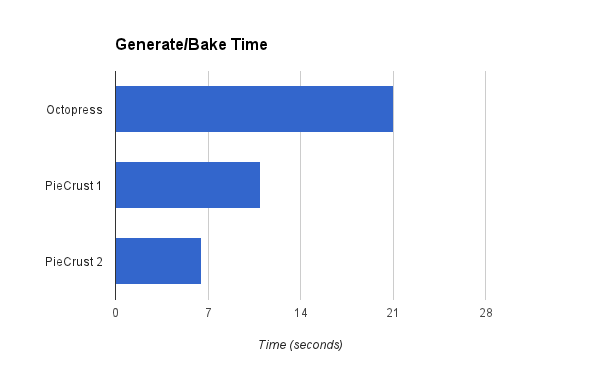
To give you an idea of how much this impacts performance, here’s a little graph. It shows the time it takes to bake my blog (the one you’re reading now!) using Octopress (the most popular static website generator around), PieCrust 1, and the newly written PieCrust 2. Obviously, shorter is better.
Octopress takes around 21 seconds3, PieCrust 1 takes around 11 seconds4, and PieCrust 2 takes around 6.5 seconds! And that’s even before I’ve made any optimization pass specific to this new codebase!5.
So yes, there is quite a substantial gain after the move to Python and parallel baking already. And that’s even before I can get into other improvements… for example, chef serve will be able to start a background thread to monitor changes to static assets on the file-system instead of checking for them when HTTP requests come in. This should make the preview server much snappier when you’re refreshing a page that has several images or CSS sheets.
Next post we’ll look at how you can upgrade your existing PieCrust 1 website to version 2, since I took the opportunity of a major version bump to clean up a few things I didn’t like anymore.
Except for date formats. Sadly, date formats are very much tied to the underlying framework – unless you implement your own wrapper syntax – and this is one annoying breaking change when upgrading to 2.0. I’m open to ideas to fix that of course! ↩︎
There are a couple extensions available to fill the gap, but they’re just terrible. ↩︎
And that’s only for the posts on this blog, along with the tag pages, with simplified markup… my crude interop script strips out code highlighting blocks and other expressions (e.g.{{foo}} expressions). I’m expecting the real thing would take an additional second or two. ↩︎
See how little it matters whether PHP sucks more or less than Ruby? Design and implementation are a lot more important for the big gains. ↩︎
Most optimizations from PieCrust 1 were ported over to the Python codebase already. ↩︎
The big question I wanted to answer was how far you can go with just the default configuration, which is based on SQLite and requires no setup from the user. The reason for this was twofold:
I needed to write some advice in the documentation about when you should start looking into more sophisticated setups.
I plan to setup a public test wiki where people can try Wikked directly, and I needed to know if it would go down after I post the link on Reddit or HackerNews.
Initial assessment
The first thing I did was to figure out the current status of the code. For this, I took the first stress-test service I could find (which was Load Impact), and got my own private wiki tested.
This private wiki runs on the same server as this blog, which is a fairly under-powered server since almost all of my public websites are just static files, thanks to PieCrust: it’s a Linode VPS with only 512Mb of RAM.
The test requests a dozen different pages from the website, continually for around 10 seconds, with only a fraction of a second between each request. It increases the number of “users” running that test over time.
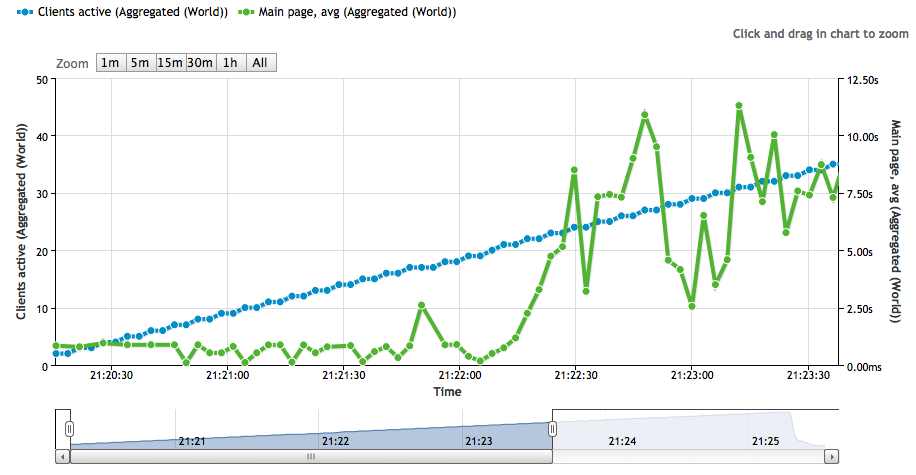
Here are some of the results:
As you can see, as the number of concurrent users increases, loading a page stays on average under a second, at 800ms. Then, around 20 concurrent users, things break down horribly and it can take between 3 and 10 seconds to load a page.
For a website running with SQLite on a server so small that Linode doesn’t even offer it anymore2, and designed mainly for private use, I think it’s pretty good. I mean, I initially didn’t plan for Wikked to run for groups larger than 10 or 15 people, let alone 20 people at the same time!
Still, I can obviously do better.
Request profiling
Werkzeug supports easy profiling of requests, so I added an option for that and looked at the output in QCacheGrind3. As I thought, pretty much all the time is spent running the SQL query to get the cached page, so there’s little opportunity to optimize the overall application’s Python code.
In Wikked, SQL queries are done through SQLAlchemy. This is because even though those queries are simple enough that even I could write them by hand, there are subtle differences in SQL dialects depending on the database implementation, especially when it comes to schema creation. I figured I would bypass the ORM layer if I need to in the future.
SQLAlchemy can be forced to log all SQL queries it generates, and that highlighted many simple problems. I won’t go into details but it boiled down to:
A couple of unnecessary extra queries, which came from my object model lazily loading stuff from the database when it didn’t need to.
Loading more columns than needed for the most common use-case of reading a page. Some of them would generate JOIN statements, too.
I also realized I was doing my main query against an un-indexed column, so I changed the schema accordingly… derp duh derp (I’m a n00b at this stuff).
Funkload
Now I was ready to run some more stress tests and see if those optimizations made a difference. But although Load Impact is a very cool service, it’s also a commercial service and I was running out of free tests. I didn’t want to spend money on this, since this is all just hobby stuff, so I looked for an alternative I could setup myself.
I found a pretty neat library called FunkLoad, which does functional and load testing. Perfect!
I started 4 Amazon EC2 instances, wrote an equivalent test script, and ran the test. To make it work, I had to install FunkLoad from source (as opposed to from pip), and troubleshoot some problems, but it worked OK in the end.
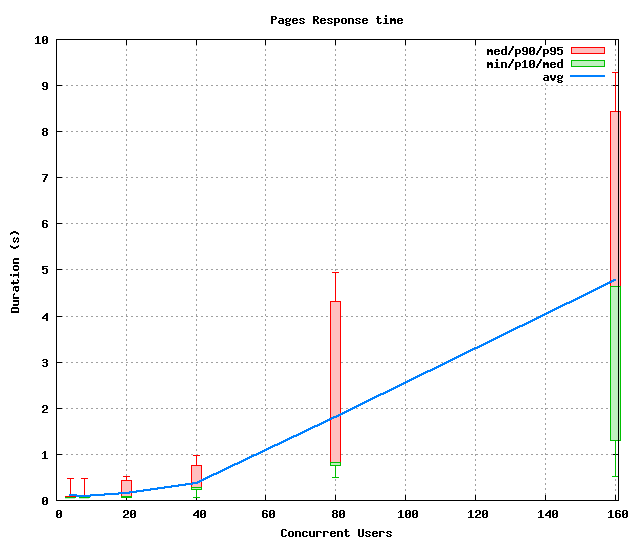
Without my optimizations, I got slightly better average page loads than before – probably coming from the fact that both my EC2 instances and my Linode server were on the west coast, whereas Load Impact was running from the east coast.
With the optimizations, however, it looked a lot better:
As you can see, Wikked on my small server can now serve 40 concurrent users without breaking a sweat: 300ms on average, and always less than 1s. And it could probably handle up to 50 or 60 concurrent users if you extrapolate the data a bit.
Moar hardware!
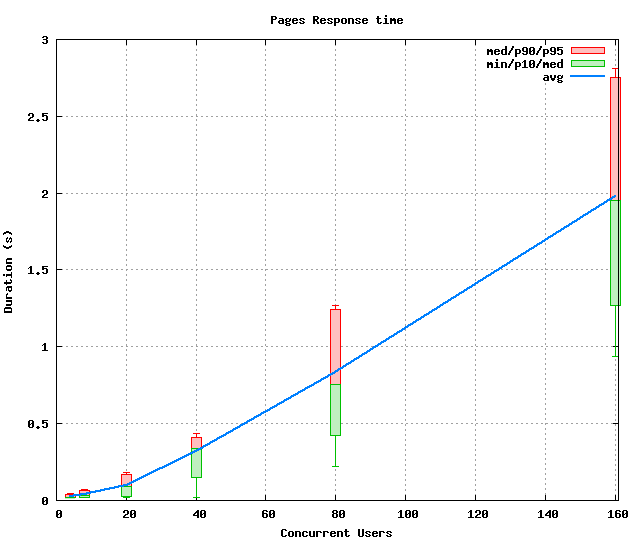
Next, I figured I would try to see if it made any difference to run the same setup (Wikked on SQLite) on a beefier server. I launched an EC2 instance that’s way better than my Linode VPS, with 3Gb of RAM and 2 vCPUs.
Well: yes, it does make a difference. This bigger server can serve 80 concurrent users while staying under the 1 second mark most of the time. Yay!
Conclusion
Those numbers may not seem like much but this is as good a time as any to remind you that:
I’m sticking to sub-1s times as the limit, because I like fast websites. But I could easily move the limit up to 1.5 seconds and still be within a generally acceptable range (e.g. from my home laptop, Wikipedia serves its pages in around 1.3 seconds).
This is about testing the most simple Wikked setup, based on SQLite, because that means the easiest install experience ever compared to other wikis that need a proper SQL server. And SQLite is notoriously limited in terms of concurrent access.
Serving even just 40 concurrent users is actually quite high. If you consider, say, 10 minutes per visit on average, that’s around 240 visitors per hour, or 1920 visitors per day if they’re all going to be mostly coming from the same time zone. That’s more than 50.000 visitors a month4.
Still, this is my first real web application, so there’s probably even more room for improvement. I’m always open to suggestions and constructive criticism, so check-out the code and see if you can spot anything stupid!
In the meantime, I’ve got some documentation to update, and a public test wiki to setup!
It’s still missing a custom theme and a fancy logo, by the way. That will be coming as soon as I have any actual idea of what to do there! ↩︎
It’s not a typo. QCacheGrind is a Qt version of KCacheGrind, so that you don’t need to install KDE libraries, and it looks slightly less terrible. ↩︎
The real issue is however how your site will behave if all of a sudden a lot of those visitors arrive at the same time. This is probably not uncommon if you have the kind of wiki where there can be announcements posted to a mailing list or a Facebook group, which can in turn get a lot of members to click the same link. ↩︎