Ramblings of General Geekery

SiloRider 0.3.0

I haven’t talked about SiloRider in two years, and even then it was the only time I mentioned it on this blog since I announced it eight years ago! I’m obviously not good at advertising or project management. But I’m decent at coding, and if you looked at the repository, I’ve been slowly maintaining SiloRider all this time. After all, I’m using it daily with this blog, which crossposts to my social media.

It’s been long enough that I need to re-introduce SiloRider: it’s a Python command-line utility that parses your blog’s homepage for microformat markup, and cross-posts your content to social media platforms. Basically, it’s how I post here on my blog, and everything then shows up on my Bluesky and Mastodon accounts.

Anyway, I was way overdue for a new release! SiloRider 0.3.0 is now available on Pypi, in case anybody out there wants to try it out. But watch out, this is very much a “works on my machine” kind of project, so you need a bit of technical know-how to get it running. I would happily welcome contributions to make it more user-friendly.

Notable new features since 0.2 include:

  • Posting to Bluesky. This includes support for rich text, such as hyperlinks in your skeets.
  • Posting to Facebook Pages. Posting to personal accounts isn’t supported, since Zuckerberg shut that down a few years ago to try and keep you inside his silo. But Pages, used by brands and businesses and so on, do support automated content.
  • Automatic resizing of pictures in a micropost, for silos with file size limits.
  • Generation of “social cards” for links in your posts, for silos like Bluesky who don’t do it themselves.
  • Converting GIFs to MP4, for silos like Bluesky who only support “proper” videos.

And of course, a whole bunch of bug fixes. So many bug fixes, especially around the finicky ways of determining character counts for those silos with character limits.

I’ll try to post more regular updates about SiloRider going forward, but most of it will be bug fixes, unless something notable happens in the social media landscape on par with the exodus from Twitter.


POSSE is in the air

Cryptocurrency critic, technology researcher, and software engineer Molly White recently published this great primer on the “POSSE” philosophy in her “Citation Needed” newsletter:

A simple technique offers the best of both worlds: total control over your own work, while still maintaining a presence on third-party platforms.

POSSE is a pretty bad acronym (standing for “Publish (on your) Own Site, Syndicate Elsewhere”) describing a pretty good approach where you publish your writings, status updates and cute pet photos on your own website before some sort of (preferably automated) system posts a copy to various 3rd party proprietary services (aka “cross-posting”).

The next time a new social media site comes along, you can plug it in to your existing system. And the next time a social media site dies or becomes untenable, you just disconnect it. With this model, even when a platform goes under, you lose relatively little: your posts still remain live and under your control on your site, even if the copies of them on the disconnected website are abandoned or deleted.

There are many advantages and inconveniences about the POSSE philosophy, and Molly outlines the main ones very well. For what it’s worth, I’m with her when it comes to engaging in conversations originating from the 3rd party services: I don’t “backfeed” replies from Mastodon or Bluesky or whatever into comments on my website, and instead I just check those services every now and then and reply there. Anyway, check out the original article if you’re new to that sort of thing, and share it if you’re not!

I’ve been following the POSSE approach for about 8 years. Like most people, I’ve written my own ad-hoc tools to implement it, and for a bit more than 6 years this tool has been SiloRider, available on Sourcehut (using Mercurial) and Github (using Git).

The interesting thing (to me) about SiloRider is that it works independently of your website. It fetches and parses your blog’s HTML markup, looking for microformat information, which most blogging engines implement, at least partially. SiloRider extracts your latest updates from that, and can cross-post any new ones to a variety of services. It currently supports Mastodon, Bluesky, Twitter, and Facebook Pages. When I moved away from PieCrust and returned to WordPress, SiloRider kept chugging along.

Of course, SiloRider isn’t super user-friendly: it’s a command-line tool written in Python, and is therefore meant for tech-people. Sure, I have a super barebones WordPress plugin that invokes it after I’ve published an article, but that plugin is so rough I hesitated a bit before making it public just now (as usual, it’s available on Sourcehut and Github). But if someone is motivated enough, it should be feasible to make it user-friendly enough for a vanilla WordPress user.

Anyway, if you want to give POSSE a try, SiloRider might do the job! I may even reply to questions and bug reports…

I’m always impressed by people who treat their online presence as easily discarded stuff. They abandon their Twitter accounts with the same shrug as when they abandoned Yahoo Mail or Live Journal or whatever, leaving all their emails and posts to rot. I suppose that life is too short to care about emails from 2004 or DMs from 2011, but I so often find myself grateful to be able to refer to some of those old archives that I can’t see myself ever discarding anything. Does that make me a digital hoarder?


Discontinuing PieCrust and Wikked

There haven’t been any blog posts about some of my open-source projects in a while and the reason for this is two-fold. First, I’ve been lazy about that side of my hobbies while I’ve been re-allocating my free time to writing and illustrating roleplaying game books. Second, I’ve actually discontinued a couple of my main projects: PieCrust and Wikked.

Read more…

Computer Files Are Going Extinct

Although it’s somewhat ironic that this article was written on Medium, this is a very good rant on obsolescence of files:

I love files. I love renaming them, moving them, sorting them, changing how they’re displayed in a folder, backing them up, uploading them to the internet, restoring them, copying them, and hey, even defragging them. As a metaphor for a way of storing a piece of information, I think they’re great. I like the file as a unit of work. If I need to write an article, it goes in a file. If I need to produce an image, it’s in a file.

I also love files. That’s why I put them in a NAS. And then I have another NAS to backup the first NAS. That’s why my blog is essentially generated from a bunch of files, and why my notes are in a wiki that’s also generated from a bunch of files. Files are easy to edit, store, version, backup, recover. Sure, they don’t scale very well to giant online services, but for personal use, they’re the absolute best in my opinion. Of course, they’re also the worst for companies who want to lock you in and profit from your data under cover of “convenience”.

But Apple doesn’t make it that easy to get to your files. Images are dumped into a big stream, sorted by date. Audio is somewhere in iTunes. Notes are… in a list? Apps are scattered around the desktop. Some of my files are in iCloud. You can email photos to liberate them from the iPhone, and through a convoluted method via iTunes, you can access some files within certain apps. But those files are transitory — cached, and may be deleted without warning. These aren’t like the carefully crafted files and folders on my computer.

This one of the reasons I have a love/hate relationship with my iOS devices. And if you look at the number of apps that support some Dropbox or Box integration or similar, I don’t think I’m the only one. I’m actually not even sure Dropbox would have been as popular if Apple had initially released iOS with friendly support for moving files in and out of the device. Most of the apps I use on a regular basis on my iPad are ones that can interact with the files in my home network, like Plex or GoodReader. I refuse to store stuff on iCloud (except as a form of extra backup), regardless of how many times Apple insists on running advertisements on my phone in the form of notifications you can’t disable1.

Anyway, read the whole article, as it’s making several other interesting points on the subject.

Bottom-line: I also miss files. We eventually got the big companies to sell music as DRM-free files, but it looks like it’s never going to happen for video. Everything is a cloud subscription service, now. Everything is streaming. Everything is a timeline. It’s not just about files going extinct, it’s about the very concept of “ownership” going obsolete.


  1. Apple has been getting worse on that front, lately. ↩︎


Wikked 0.8.1

I recently published version 0.8 of Wikked, my plain-text-files/SCM-backed
wiki engine, followed immediately by a quick little patch release. Grab it as
usual with a pip install wikked -U!

The witch

Although there are a few interesting new things in this release, the more
important announcement here is the launch of the official website
running itself on Wikked! Head over there now and tell me if anything
looks broken!

Keep reading if you want more information about all this.

New and Improved

There is now a simple way to upload files to your wiki – both as global files
(uploaded to the _files directory) or as page-local files (uploaded next to
the current page’s file). It looks like this and yes there is room for
improvement 🙂

Upload dialog

The permission system has been re-written to use a more standard ACL-type model. You can check out the help section on permissions for more information…

…which leads me to the new help pages. You can see them on the official
website
, but they come bundled with any Wikked wiki, since they’re part
of the source code. As such, they’re read-only (although you can edit them and
submit a pull request if you spot a mistake!). You can access them from the
“Help” link at the bottom of any wiki page.

Another thing you might have noticed with that link to the help section on
permissions is that Wikked now generates links for each heading on a page.

Last but not least, I re-did the UX of the navigation menu so that it finally
works correctly on both desktop and mobile browsers.

The Official Wiki

The other big new thing is the official Wikked wiki, which runs on
Wikked (unlike the previous official project page which was just a static page
generated with my other big web project, PieCrust).

Right now it looks a bit like this:

Wikked wiki home

There’s not much to say about this besides “it’s about time”. There’s not even
much on that wiki yet – most of the content comes from the aforementioned new
help pages.

I wonder how long it will take until somebody finds a security hole in Wikked
and adds a dick pic to the home page. Oh well, I’ll worry about that if Wikked
actually gets popular… and even then, if you really want to post dick pics,
you can already do that on the Wikked sandbox wiki or, well, anywhere
on the internet, really.

And that’s it! If you haven’t checked out Wikked yet, give it a go:

  1. pip install wikked
  2. wk init mywiki
  3. cd mywiki && wk runserver

Enjoy!


Announcing SiloRider

Lately, I’ve been spending my free time making PieCrust (the static website generator powering this blog) support Indieweb things like Micropub and (incoming) Webmentions. But while being on the receiving end of things requires intimate knowledge of a CMS’ storage format, other Indieweb concepts put your website on the sending end, and that generally doesn’t rely on anything else than the final HTML markup… it’s therefore CMS-agnostic.

To implement that side of the Indieweb coin, I decided to write a new tool, independent of PieCrust: it’s called SiloRider1!

What it does right now is let you adopt the POSSE model with your website. After you’ve published a new article or post, you run SiloRider and it will syndicate (or “cross-post”) that out to “silo” services – right now it supports Twitter and Mastodon.

For instance, this recent update from my blog was syndicated like this on Twitter and like this on Mastodon:

In the future, it will probably send Webmentions out to websites you’re replying to, and other such things that can be done by parsing the just-published pages on your website.

In PieCrust, I integrate SiloRider simply by making my default publisher run a script that bakes the website, rsyncs it to the publicly served folder, and invokes SiloRider – this way, it works whether I post from a client app like Micro.blog’s iOS app, from the PieCrust admin panel, or after pushing my blog repo to my server (since I have a hook that runs that same publisher). You can similarly run it after your Hugo deployment, or whatever it is you use to make your website.

As with all my other projects, the documentation is up on BOLT80, and the code is available on GitHub and Bitbucket, depending on whether you prefer Git or Mercurial.


  1. It’s named like this mostly because I’m bad at naming things, and after
    spending a long time trying to come up with a name, I suddenly became very
    frightened I might take longer to name it than to code it, so I picked
    whatever popped in my head next. ↩︎


PieCrust 3.0

Last year I announced PieCrust 2.0 without much fanfare and, guess what, here comes PieCrust 3.0 now!

The funny thing is that I didn’t post much about PieCrust during that whole time… the joke about blog engines is that the more you work on them, the less you actually use them.

So as is tradition, I released the new version of PieCrust on the Python package server and immediately found a bunch of new bugs, which I proceeded to fix (we’re now at PieCrust 3.1.1)… I’m not very good at this whole thing, even after several years.

But either way, it’s out! You can run pip install piecrust -U and read the rest of this post if you want to know what’s new.

This release has breaking changes so make sure you read the upgrade notes this time around.

The highlights in this release include:

  • Simplified content model: there are now just content sources and URL routes. The previous “page generator” concept (which was used for taxonomies and blog archives) is now just a content source that happens to not return pages on disk, and instead comes up with pages on the fly. This makes things a bit simpler for the site configuration.

    There is a new concept however, which is the concept of a “content pipeline”, which is the thing that knows how to render a source’s contents. It’s a lot less user facing though – in most cases users don’t need to bother with it.

  • Better administration panel: the administration panel now supports talking to client apps (via the Micropub standard) to create new posts. This means you can post to your static website from your phone with apps like Micro.blog! This requires some server-side setup however, so you have some work to do.

    In the PieCrust 3.0 cycle I’ll actually be mostly looking at adding more IndieWeb technologies like Micropub – Webmention is next, which will let your site display comments.

  • Watchdog-enabled chef server: when you run chef serve, you can have PieCrust monitor your assets (like CSS/JS files) and re-process them when you edit them (unless you’re using another more sophisticated asset pipeline like Gulp or Webpack or whatever). In PieCrust 2.0 it was using a very basic polling system, but now it’s using Watchdog, which means it works with your OS to get notified of file changes. The main upside is a more efficient file monitoring that’s a lot more battery friendly for laptop users.

As always, if you see any bug, report it on the GitHub issue tracker.


Piecrust 2.0 and Beyond

As is tradition, PieCrust 2.0 was released without much fanfare a few weeks ago. Just like with the previous version, it just happened because, well, nothing happened: I was using PieCrust for a couple other websites without any problem or need for new features, so I figured it might be as good a time as any to make it official.

Time to run pip install -U piecrust.

Since then of course I found a few bugs, so a 2.0.1 release is just around the corner, but that’s just business as usual.

What’s more interesting, first, is that I’ve been a bit quiet over here for the past couple months, and that’s because I was busy with my second hacking project from the holiday break (the first one of which was the recently announced Jouvence). Sadly it didn’t really pan out like I expected, so after working on it for a while I’ve now shelved it for the time being. These things happen.

The second thing is that I started work on PieCrust 3.0. It’s a mess right now but the goal there is to get rid of a bunch of cruft that accumulated over the years. As such, it will break backwards compatibility quite a lot (hence the major version bump) but I’m hopeful the result will be easier to use, easier to
maintain, and maybe even hopefully a bit faster.


PieCrust 2.0rc2

PieCrust 2.0rc2 was published a couple days ago, and it’s mostly a bug fix and clean-up release, as you might expect. Run your pip install piecrust --pre -U to update, or whatever you do usually. More info after the jump.

Since there are mostly bug fixes in this release, there’s only a few small user-facing change to discuss here.

SFTP publisher

Are you using the recent new publishing features? You should! Now there’s an SFTP publisher. See the publishers reference for details.

Simplified URL functions

I did some simplification of the way URL routing is handled. The biggest change is that URL functions now don’t need to specify their parameters. Here’s how it works:

  • You define a custom source… for instance the PieCrust documentation site defines 2 separate sources, one for the user documentation and one for the API documentation.
  • In the routes defined for those 2 sources, you can specify a func property which is the name of a function available through the template engine to generate URLs for these routes. In the aforementioned documentation configuration, these functions are docurl and apiurl (so one documentation page can link to another by writing {{docurl('something/else')}} for example).
  • The parameters to pass to the URL function are the same as the placeholders in the URL itself… so if the route is /blog/%year%/%slug%, you need to pass the year and the slug into the function ({{posturl(2016, 'my-new-post')}}).

You can see the (updated) documentation on routes for more details.

Merged taxonomy terms

By default, PieCrust “slugifies” your taxonomy terms (like tags) using URL encoding, so that something like “étrange” (“strange” in French… not the accented first letter) is transformed into “%C3%A9trange” (which your browser will properly show as “étrange”).

However, you can also tell PieCrust to do different slugification1, with the site/slugify_mode configuration setting. So say you set it to lowercase,transliterate… it will transform your tag names to lowercase and replace accented and non-latin characters with their closest equivalent. In this case, “étrange” gets slugified to “etrange” (without the accent), and “Technology” gets replaced with “technology” (lowercase).

Of course, it means that 2 slightly different tags can resolve to the same slugified tag – for example, “étrange” and “Etrange”. In this case, PieCrust will now warn you that you spelled things differently in some pages, but will combine both – i.e. the page listing for the term “étrange” will also list the posts where you spelled it “Etrange”.

As always, the full list of changes is available on the CHANGELOG.


  1. Yes, that’s totally a word a made up. ↩︎


Baking faster with hoedown

Update: the times reported by the Bench utility are CPU times, i.e. they represent the time spent working by your various CPUs. The “real/wall” time, i.e. the time you effectively have to wait as a user, is usually a third less than that. So the “real” time for my blog went roughly from 7 seconds to 5 seconds.

In a previous blog post about PieCrust performance, I mentioned how static site generators are dependent on the performance of their formatting and templating libraries. One of the most common formatters are Markdown formatters and, by default, PieCrust uses Python Markdown. It’s the easiest one to install and use, but it’s far from the fastest one.

As far as I know, the fastest one that’s still maintained is Hoedown, for which some Python bindings exist. And if you have a recent enough version of PieCrust, there will be support for a Hoedown formatter, as long as you install Hoedown. You can do that by running pip install hoedown.

Once installed, you can make replace Markdown with Hoedown by writing this in your config.yml, or in a config variant:

site:
    default_format: hoedown
    auto_formats:
        md: hoedown

Any extensions you have declared for the Markdown formatter generally also translate directly to Hoedown:

hoedown:
    extensions: [fenced_code, footnotes, smartypants]

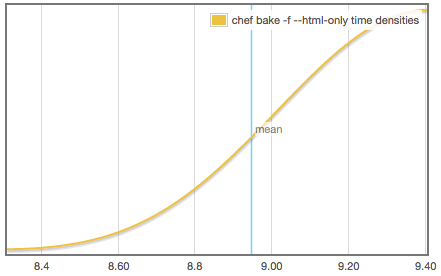
The performance increase can be pretty noticeable. For instance, on my ancient MacBook Pro (2.4GHz Core 2 Duo), this blog takes almost 9 seconds to bake1:

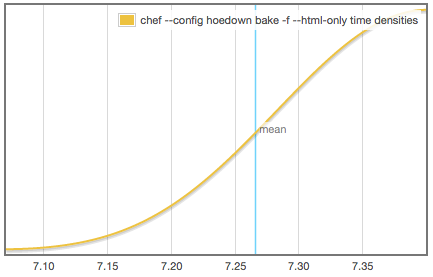
With Hoedown, the time goes down to 7.2 seconds:

Pretty worth it if you ask me! Now most of the time spent baking happens during templating with Jinja2… time to look for a faster alternative?


  1. I used the Bench tool to generate those reports. ↩︎