As is tradition, PieCrust 2.0 was released without much fanfare a few weeks ago. Just like with the previous version, it just happened because, well, nothing happened: I was using PieCrust for a couple other websites without any problem or need for new features, so I figured it might be as good a time as any to make it official.
Time to run pip install -U piecrust.
Since then of course I found a few bugs, so a 2.0.1 release is just around the corner, but that’s just business as usual.
What’s more interesting, first, is that I’ve been a bit quiet over here for the past couple months, and that’s because I was busy with my second hacking project from the holiday break (the first one of which was the recently announced Jouvence). Sadly it didn’t really pan out like I expected, so after working on it for a while I’ve now shelved it for the time being. These things happen.
The second thing is that I started work on PieCrust 3.0. It’s a mess right now but the goal there is to get rid of a bunch of cruft that accumulated over the years. As such, it will break backwards compatibility quite a lot (hence the major version bump) but I’m hopeful the result will be easier to use, easier to maintain, and maybe even hopefully a bit faster.
PieCrust 2.0rc2 was published a couple days ago, and it’s mostly a bug fix and clean-up release, as you might expect. Run your pip install piecrust --pre -U to update, or whatever you do usually. More info after the jump.
Since there are mostly bug fixes in this release, there’s only a few small user-facing change to discuss here.
SFTP publisher
Are you using the recent new publishing features? You should! Now there’s an SFTP publisher. See the publishers reference for details.
Simplified URL functions
I did some simplification of the way URL routing is handled. The biggest change is that URL functions now don’t need to specify their parameters. Here’s how it works:
In the routes defined for those 2 sources, you can specify a func property which is the name of a function available through the template engine to generate URLs for these routes. In the aforementioned documentation configuration, these functions are docurl and apiurl (so one documentation page can link to another by writing {{docurl('something/else')}} for example).
The parameters to pass to the URL function are the same as the placeholders in the URL itself… so if the route is /blog/%year%/%slug%, you need to pass the year and the slug into the function ({{posturl(2016, 'my-new-post')}}).
By default, PieCrust “slugifies” your taxonomy terms (like tags) using URL encoding, so that something like “étrange” (“strange” in French… not the accented first letter) is transformed into “%C3%A9trange” (which your browser will properly show as “étrange”).
However, you can also tell PieCrust to do different slugification1, with the site/slugify_mode configuration setting. So say you set it to lowercase,transliterate… it will transform your tag names to lowercase and replace accented and non-latin characters with their closest equivalent. In this case, “étrange” gets slugified to “etrange” (without the accent), and “Technology” gets replaced with “technology” (lowercase).
Of course, it means that 2 slightly different tags can resolve to the same slugified tag – for example, “étrange” and “Etrange”. In this case, PieCrust will now warn you that you spelled things differently in some pages, but will combine both – i.e. the page listing for the term “étrange” will also list the posts where you spelled it “Etrange”.
As always, the full list of changes is available on the CHANGELOG.
Update: the times reported by the Bench utility are CPU times, i.e. they represent the time spent working by your various CPUs. The “real/wall” time, i.e. the time you effectively have to wait as a user, is usually a third less than that. So the “real” time for my blog went roughly from 7 seconds to 5 seconds.
In a previous blog post about PieCrust performance, I mentioned how static site generators are dependent on the performance of their formatting and templating libraries. One of the most common formatters are Markdown formatters and, by default, PieCrust uses Python Markdown. It’s the easiest one to install and use, but it’s far from the fastest one.
As far as I know, the fastest one that’s still maintained is Hoedown, for which some Python bindings exist. And if you have a recent enough version of PieCrust, there will be support for a Hoedown formatter, as long as you install Hoedown. You can do that by running pip install hoedown.
Once installed, you can make replace Markdown with Hoedown by writing this in your config.yml, or in a config variant:
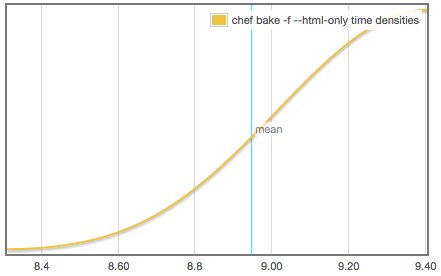
The performance increase can be pretty noticeable. For instance, on my ancient MacBook Pro (2.4GHz Core 2 Duo), this blog takes almost 9 seconds to bake1:
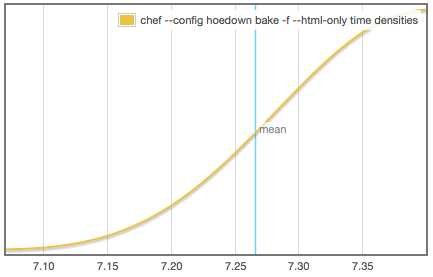
With Hoedown, the time goes down to 7.2 seconds:
Pretty worth it if you ask me! Now most of the time spent baking happens during templating with Jinja2… time to look for a faster alternative?
I used the Bench tool to generate those reports. ↩︎
PieCrust 2.0rc1 is now out! The last piece of the puzzle (or should I say the pie?), page generators, is now in place.
You can run pip install piecrust --pre -U to update from PyPi, or grab it from BitBucket or GitHub.
More details after the break.
Page generators
The big new feature in this release are page generators. They’re basically a generalization of the previous taxonomy feature, which used to let you define taxonomies (tags, categories, etc) to classify your pages, and then PieCrust would generate one page for each term that you use (e.g. each tag would get its own page).
But the concept of generating pages based on what’s in the “normal” pages is also useful for other things… for instance, blog archives – assuming you don’t want all your archives to be in one page, like you had to do before. Instead, you could have one page per year, for instance.
That’s exactly what PieCrust 2.0rc1 ships with – a yearly blog archive generator, in addition to the taxonomy system. By default, if you create a pages/_year.md page, it will start creating yearly archive pages based on it.
Page generators benefit from the same kind of parallelism and caching that all other page sources have during a bake, so it should be as fast as before.
PieCrust 2.0 beta 5 is now live on PyPi, so you can go ahead and pip install --pre piecrust -U to get it.
The 2 big new features in that release are the last reasons I switched to Python for PieCrust 2 after packaging and multi-core support: better ways to launch and manage sub-processes. This lets me do:
Publishing support, because baking your site is only the beginning, and you actually need to upload that stuff somewhere.
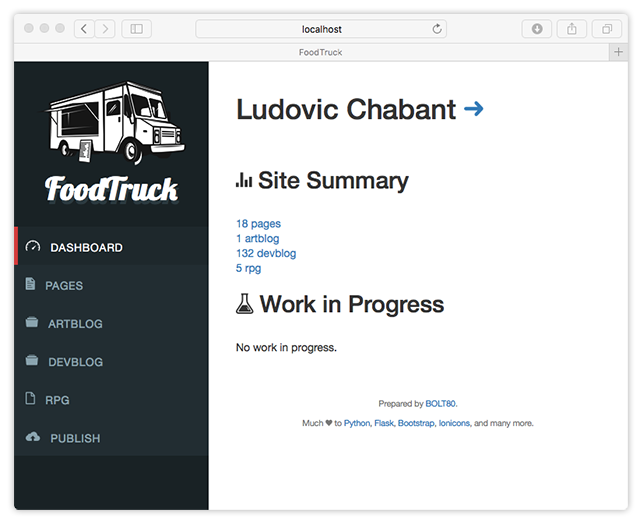
“FoodTruck”, an optional administration panel to work on your site(s) the same way you would with a traditional system like WordPress.
More after the break.
Publishing
A lot of static website generators out there already have this concept of “publishing” your website, i.e. not only bake it, but also upload it to some FTP server, rsync it, push it to GitHub pages or an S3 bucket or whatever. Support varies from system to system.
Well now PieCrust at least has the basic infrastructure to support the same kind of feature – something I have been delaying for too long! There’s only support for arbitrary shell commands and rsync, but I’m hoping more publish targets will come soon.
I’ve wanted to do this for a while now, but had to figure out the right way to do it, which is to provide a web administration dashboard that you can use to work on your website.
Now I know what you’re thinking. Isn’t the whole point of static website generators that you keep everything simple as text files, and you use your favorite (and most productive) text editor? Well, of course!
But the reality is that you need an optional adminstration panel for 2 reasons:
First, you want to attract newbies and non-technical people to the dark side of flat-file CMSes. Making it attractive and usable to them will hopefully be one of the gateways for them to become more technical, and in turn maybe participate in this wonderful melting pot that is the open-source web.
Second, have you seen the average blogging frequency of a static website user? Have you seen mine1? I believe that it’s a consequence of the price we pay in terms of practicality: to post something new, we have to get to a computer that has our site repo, and some way to bake and upload that to our web server. But it doesn’t have to be that way. You could also have an administration panel running on your server, so that you can also quickly post on the move, from your phone, and it would take care of baking and publishing for you in the background.
As I was writing FoodTruck, a couple static website generators appeared with an administration panel – most famously Lektor, by Python superstar “mitsuhiko”2. As far as I can tell, these are mostly geared towards the first reason, i.e. provide a nicer, user-friendly way to edit your website.
Hopefully, they start moving towards the second reason too. That second reason is actually the heart of FoodTruck, although there’s still a lot of work to get there. Consider:
The administration panel needs to run some heavy process (baking and publishing) from a web page.
The administration panel needs to be able to submit to your Git/Hg/etc. repository so you can then pull the edits you made on the go once you get back home.
The administration panel needs to be secure, obviously. And I don’t know shit about web security.
It can do most of that already, but not well enough yet for me to be comfortable with letting you all run this code on a public web server… so stay tuned for the next few releases, and check out the documentation on the administration panel for more info.
Ironically enough, my blogging frequency went down around the time I started writing my own blog system… although that’s slightly misleading, because that’s also around the time I started having kids, and coincidentally figured I should focus more on fewer home projects in order to actually ship them, instead of always leaving them in a half-finished state. ↩︎
There go my chances of having the most popular Python static website generator! ↩︎
I originally wrote Wikked as a single page app because, well, I wanted to have a little fun and learn something new. And it worked (I did have fun learning Javascript past the “copy JQuery snippets from the internet” phase), but it didn’t really work (it made testing and deploying unnecessarily harder). It could have also been argued that making this an SPA was overkill… at least, it did bother me a bit, since I tend to prefer simpler/old-school technologies.
Anyway, I embarked on a giant refactor of the code base to reimplement the front-end using a more classic architecture, and the last couple versions of Wikked are the result of this transition. You shouldn’t see anything new, besides a few less old bugs, a few new bugs, and an overall more stable experience.
New documentation
In the process, I also got rid of the old documentation page I had on BOLT80, and made a proper versioned documentation website, just like with PieCrust. That website is part of the Wikked codebase so you can easily send patches for it… and of course, it’s made with PieCrust.
You can check it out at the same place as before on BOLT80. It’s still a work in progress design-wise – it’s meant to look similar to a Wikked-powered wiki, but it still lacks a bit of graphics and other stuff to make it look less sterile.
Next steps
As always after I spend a few months doing some giant task with the limited free time that I have, I need to get back to my other projects and reply to the various bug reports and pull requests I haven’t replied to in weeks. Then it’s back to business as usual, I hope… at least unless I get into another big refactor.
PieCrust news – and this blog – have been pretty quiet for the past couple months, and that’s because I’ve been busy working on PieCrust 2 performance.
TL;DR: PieCrust 2 now runs in multiple cores, which speeds up the baking process quite a bit. Update your repositories, or grab the latest version from Pypi!
It had to happen eventually, but PieCrust 1.x is now officially deprecated. It was deprecated more or less unofficially before, as you can see from the lack of activity on the repository, but, well, here it is.
The PieCrust 2 help pages are now showing up by default at the official URL, and that’s where I’ll be focusing from now on.
If you want to upgrade your existing 1.x website to 2.0, you can follow the installation and upgrade instructions. And of course, please contact me if you have issues or feedback!
I’ve been quite silent for the past few weeks because I’ve been mostly working on the PieCrust 2 documentation website – a lot of time spent writing stuff, trying out different layouts, figuring out how to organize the information, and coding the infrastructure tools that will generate separate documentations for each release.
Now at least I’ve got half of something to show, in case some of you want to provide feeback or – gasp – help! Head over to the PieCrust 2 documentation preview to see it in all its work-in-progress glory!
At this point, it’s only about a third done, so there’s probably another few weeks of work. But it’s interesting how writing documentation forces you to polish a product. This is not new – it’s really a variation of README-driven development – but that’s why it’s taking a long time: a good chunk of the documentation writing time is looking at what I just wrote, thinking that it’s completely stupid, writing what it should be like, and then fixing the code so it does exactly that.
Now that you know about PieCrust 2 and you’ve upgraded your website, it’s time to look at the really new features. Today we’ll talk about the 2 ones that I think are most important: the new content model, and the new pagination model.
(this post is going to be a bit long so here’s something to keep you hungry)
Sources, routes, and taxonomies
In PieCrust 1, like in most other static website generators, the way content was defined was quite rigid: you could have pages, and you could have blog posts. PieCrust did a few extra things, like letting you have multiple blogs, each with its collection of posts, but that was it.
The only way to have a specific set of pages, different from other pages, was to use page metadata and filtering (say, filter pages where type is recipe to get all recipes), but that didn’t translate to a good file-system organization, required remembering to tag things correctly, and required to use the inverse filter to get the other pages. You also couldn’t have a different URL format for all recipe pages, as compared to normal pages.
Enter PieCrust 2, where all the content is, under the hood, defined with sources, routes, and taxonomies. Those are generated for you to something equivalent to PieCrust 1 content if you don’t define them, but you can override that for totally custom content.
Sources
Sources are where pages come from. Two source types you already know (if you used PieCrust 1 before) are:
the “simple” page source, where pages are found recursively under a given directory, and their relative path translates to their relative URL.
one of the “blog” page sources, where pages are found in a closely structured directory, and both the date and “slug” of the post are defined by the filename. So in the case of, say, the flat post source, all posts are files named YYYY-MM-DD_foo-bar.md directly under the posts/ directory.
Because a site can have as many sources as you want, it already means you could create a “recipes” source, and put all the recipes in a different directory than the other pages, so that’s already nice.
But in the future there will also be more advanced sources. See, the “simple” page source just gives one piece of information about a page: its relative URL. But the blog post sources give more information, like the date of the article (“simple” pages need to specify it as part of their config header).
You could therefore imagine, say, a page source where each folder applies a tag to pages inside it. So if you created a page like recipes/pies/fruits/apple-pie.md, it would automatically have tags pies and fruits applied to it, as if you wrote tags: [pies, fruits] in its configuration header. Another useful source would be one that applies a hierarchical order to its pages, based on a filename prefix – this would be well suited to things like documentations.
Routes
Now that PieCrust knows where to find your content, routes define how it’s exposed – or parsed, if you were to run PieCrust as a lightweight CMS, or when running chef serve.
A route defines the shape of the URL of a page. If you’ve used PieCrust 1, you can think of it as a generalization of the post_url/tag_url/category_url settings.
At the moment, it can only use the same information as the one provided by the source (e.g. the year, month, day, and slug of a post for a blog post source), but in the future you’ll get to use all the other page metadata too (so that you can generate URLs that include categories or tags if you want).
Taxonomies
Another generalization from PieCrust 1 are the taxonomies. Before, only categories and tags would have automatically generated listing pages. Now you can have whatever you want. You just need to specify if a taxonomy can have several terms applied to a page (like tags) or not, the name of the term listing page (like _tag.html and _category.html), and a few other optional things.
Putting it all together
Let’s say we want to have a section in our website where visitors can browse our favorites recipes. We want to put all recipe pages in a recipes/ directory (next to pages/ and posts/), be able to tag them by ingredients, with listings of recipes by ingredient being created automatically, and be able to tweak the URLs for all of this.
We’ll specify appropriate sources, routes, and taxonomies in the site configuration. Let’s start with just getting the recipes going:
This will make PieCrust look for pages in the recipes/ directory, using the default page source (since we didn’t specify anything), i.e. the same as the one used for pages/. URLs that look like /recipe/foo/bar will match our new route, and a file named foo/bar.md will be loaded from the recipes/ directory in that case.
Now’s the time to add the “ingredients” taxonomy. This gets more complicated because we have several things to specify:
Add a new taxonomy named ingredients. It’s a multiple taxonomy, meaning that pages can have more than one ingredient assigned to them (this tells PieCrust it potentially has to generate listing pages for combinations of ingredients).
Add a new route for listing recipes by a given ingredient. Here, the %ingredients% token, along with the taxonomy: ingredients setting, let PieCrust know how to properly find and match content for this route.
When a listing page needs to be generated, PieCrust will look for a recipes/_ingredients.md page, passing whatever value was matched by %ingredients% to an ingredients template variable. This is analogous to how tag and category listing pages work in PieCrust 1.
Some other interesting facts:
You can list all recipes by starting with {% for recipe in recipes %}.... Sources have a page iterator exposed by default to a template variable of the same name as themselves.
You can create a new recipe page easily with chef prepare recipes foo-bar.
There are many advanced settings to change the behaviour of PieCrust, but they’re outside the scope of this already quite long blog post.
Pagination
Another big change in PieCrust 2 is how pagination is handled. In PieCrust 1, you could only paginate blog posts, but in PieCrust 2 you can paginate any list of items – pages or otherwise.
The new paginate filter lets you do that, by returning a Paginator instance, exactly like the existing pagination object. But where the pagination object returns something that lists the posts in the default blog source, the paginate filter will return something that lists whatever it was passed.
This is especially useful for galleries, as shown with my Meeting Notes doodles. This was done more or less like so:
{% set thumbs = assets|paginate(9) %}

{% for thumb in thumbs.items %}
<img src="{{thumb}}" alt="Note" />
{% endfor %}

[Older entries]({{ thumbs.prev_page }})
[Newer entries]({{ thumbs.next_page }})
Of course in reality there’s more fluff (CSS classes, etc.) and tests around using prev_page and next_page, but you get the idea. Just like in PieCrust 1, assets returns the list of page assets URLs (in this case, a whole bunch of pictures), and the paginate filter makes sure only 9 of them will be shown on a given page. It also tells PieCrust to generate sub-pages.
Obviously, you can’t use 2 pagination sources on the same page – PieCrust wouldn’t know how to generate sub-pages that go in 2 different directions, so you’ll get an error if you try that.
Call for feedback
Please get in touch with me, or post comments here, if you have some constructive feedback about this new content model. PieCrust 2 is still in alpha, so there’s time to change the design without messing up every other PieCrust user.