Ramblings of General Geekery

The Journey To Digital Comics: US Comics Apps

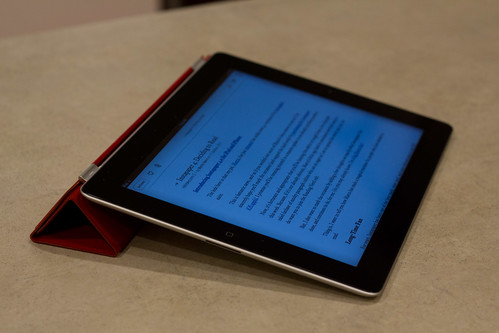
The first step in the journey to digital comics was to figure out what kind of hardware device to use. I concluded at the time that either the Transformer Prime or the iPad were the best choices available (the first one for its ideal aspect ratio and superior resolution, and the second one for its better use as a general tablet device). Since then, the New iPad (or iPad 3 if you read this 2 years in the future… thank you Apple) was released with a new fantastic display that makes it the best reading tablet on the market, so you may want to look into this one as well.

IMG_6095.jpg

The second step is to find out what channels are available to get your american comics fix.

The Elephant in the Room

Before we get to the real stuff, let me rant a bit on the subject everyone knows about: piracy. Like any other media, comic books are pretty easy to find on torrent websites or newsgroups, and it’s handy to download that stuff for free. You can then use an app like FileBrowser or even Dropbox to get the
files on your tablet, and use any of the pretty decent comicbook viewers, like Bookman, to read them.

But where I really don’t care one way or the other when it comes to movies and TV, the comics medium is much more special to me and I refuse to go through illegal means. First, pretty much none of the comics authors are nearly as wealthy as a movie actor or director – at least not the kind of actor or director whose movies you would steal. Second, it’s not like the comic industry has ever been doing well. Third, I just really want to give my money to those guys. I even purposedly avoid buying comics through iOS’s in-app purchases to make sure as much of my money as possible goes to the authors (skipping Apple’s 30% tax).

The Big Ones

Comixology

IMG_6104.jpg

When it comes to american comics, the one app that’s slowly taking over the whole market is Comixology’s Comics app, available on iOS, Android and Kindle Fire at the time of this writing. You can also read comics in any Flash-friendly browser.

It’s got a very decent catalog, and it’s constantly expanding with back issues. A few indie publishers have deals with them, along with the big ones, including DC, Marvel and Image. DC even uses Comixology as their official digital store.

One of the cool things is that those publishers came to their senses relatively quickly and now offer “same day digital” books, where new issues are available in digital format at the same time they are available in your friendly neighbourhood comic store.

Prices for new issues are between $2 and $4 (which ranges from “Ok” to “Kinda expensive”), but those prices fall down to $1 to $3 for older issues. They also have very frequent sales – not all of which would be of interest to you, of course, but it’s still a welcome policy.

Dark Horse

IMG_6102.jpg

Dark Horse decided to not go the Comixology way like the other big guys. It could have been a disaster – sometimes if you want something done right, it’s best not to do it yourself, especially if that’s not your core business – but it turned out ok.

Their online store is decent, and has a nice feature where you can search directly for “bundles” (the rough equivalent of a TPB). Prices are similar to those on Comixology, and the catalog seems well furnished (at least they have all the series I follow). As far as I can tell, they also got on board with the “same day digital” idea, which is good.

Their apps (iOS and Android at the moment) get the job done, but are not as smooth as Comixology’s. For example, you can’t start reading a comic while it’s downloading, and the navigation is sometimes a bit weird.

Graphicly

IMG_6103.jpg

I really wanted Graphicly to succeed in the market: it’s obviously run by people who love comics, and they advocate open, standardized formats that put the reader in control. But this kind of philosophy is a sure way to alienate publishers, and it’s a miracle to me that they still got, among others, Marvel or Image on board somehow, even if it’s only for a small percentage of their catalog (Marvel currently has 125 series on Graphicly and Image 111, compared to respectively 525 and 336 on Comixology).

So even though you could buy some mainstream comics on Graphicly, I’d have a hard time recommending it – you would have to split your collection between there and over at Comixology eventually, and, as we’ll see shortly, it’s better to not go through intermediaries.

Still, Graphicly has some value because they have the biggest indie comics catalog.

edit 2012/05/04: Graphicly stopped being a digital store.

The Fine Print

At this point, you would think everything’s wonderful: those apps are way more convenient than piracy, comics are available as soon as possible and everywhere (as far as I can tell – I’m in Canada), the prices are a bit high but not outrageous, you can read your books on a lot of different devices, and most of the stuff you want to buy is available to begin with (something that would seem like “yeah, duh”, but is still not obvious to the movie and TV people)… they even get a few more things right, like giving away for free the first issue of many critically acclaimed series. But it’s not all roses, sadly.

First, you don’t really own your books – they’re more licensed to you than anything else. They’re stored in a somewhat obfuscated manner on your device, or in your web-browser’s cache, and that means you can never get to the files in case you want a personal backup, or just want to read them in a different comic reader whose interface you prefer. Not that this was ever a real problem so far, but it sure is bugging me.

Second, because we’re dealing with cloud storage, usual questions like “what happens to my purchases if Comixology or Graphicly goes bankrupt?” will pop up in your head every now and then. My only solution to that problem is to cut the middle man and, as much as possible, buy your comics from the source. This means buying Marvel comics from their own digital store, DC comics from Comixology (which is their official digital store) and so on. Sadly, it means pushing guys like Graphicly out of the game (except for indie comics), but at least your money and purchase records are stored with the guys you really got your stuff from, and that’s your best chance of not getting screwed in a few years.

Third, whatever app you choose to buy a comic through will be the app you need to read it with – as if you had to use a different music player depending on where you bought a song. It’s another non-problem – as long as all readers have a decent interface and rendering engine – but it’s also slightly annoying.

The Marvel Problem

added 2012/03/30

It should be noted that Marvel is its own little world of problems at the moment. Early on, their digital strategy was quite confusing. Some of those problems disappeared – I can’t seem to find comics priced differently across apps anymore – but some remain:

  1. As far as I know, Marvel is the only publisher that uses Comixology software with their own database. Both DC and IDW apps are Comixology based, and comics bought through their store are also available in the main Comixology app (and vice versa). Not so much with Marvel, where the 2 apps are completely separate.
  2. The Marvel Unlimited Subscription sounds like a good deal: for a flat monthly fee you can read as many comics as you want. You may not get the full Marvel catalog or all the new hot releases, but it’s very interesting if you want to read all the famous golden and silver age story arcs from a few decades ago. The problem is that the Marvel Unlimited Subscription is not available on mobile devices. Yes, you read that right: the only sensible way to read a digital comic is not acceptable when it comes to reading a shitload of comics. And Marvel will not quite tell you in a straight way: instead they just mention, in small print, that it “requires Flash & internet-connected PC or Mac”. You have to guess that this excludes tablets and phones… or you do like me: get the subscription, realize after 30 seconds that it doesn’t work in their own fucking app, and ask for a refund. Marvel, you are fucked up.

Conclusion

A summary of all of the above is that I read my Marvel comics on the Marvel app, my Dark Horse comics on the Dark Horse app, and everything else on Comixology. And when I need to buy something, I avoid the in-app purchases and Apple’s 30% tax, and go instead to the app’s web store in Safari.

In the next step we’ll deal with reading digital mangas, and then move on to the pros and cons and whether digital comics are right for you.

Who Buys Books?

Tim Bray on buying books:

This works because Amazon doesn’t mind multiple devices at once having access to a book; and because our “Amazon identity” is a lightweight shopping-context thing, not like a “This is really me” Facebook or G+ identity.

This highlights a very important thing about Internet identity: identity is not something that can be modeled easily, and it’s certainly not something that’s unique, whatever Mark Zuckerberg may think.

I use the same scheme as Tim when it comes to buying Kindle books – right now I only share with my wife but the kids will get on board when they’re old enough – and that’s OK because our Amazon account reflects the family unit as the customer: when you buy a book or a movie or, for that matter, a TV or a car, you don’t buy it as yourself but as a member of a group. Some companies may have thought otherwise all these years, but it’s always been the case.


Showing off your dotfiles

With the introduction of my first Apple laptop a few years ago, my home computers went from being half Unix-like (I had a healthy mix of Linux and Windows machines) to mainly (two thirds) Unix-like. With it came a change in the kind of software I use on a daily basis and an increased need to synchronize the configuration of those programs between my machines.

Enter the “dotfiles community”: an informal group of people who, as Zach Holman puts it, think that “dotfiles are meant to be forked”.

“Dotfiles” are rooted in Unix culture – the name refers to the configuration files starting with a dot that clutter your home directory like crazy. This means you will mostly find Mac and Linux users in there (that’s ok, they’re pretty nice… usually), but to me it’s mostly about putting all your configuration files in source control in a way that makes it easy to setup new machines and share with others.

Show-off :-)

So like everybody else, I put my dotfiles out there for anyone to poke around. They’re mostly boring, but you may find a few useful things, like those I outline below (after the break). Nothing earth-shattering, but if it saves you the 15 minutes needed to write it, that’s 15 minutes you can spend on doing actual stuff.

Boostraping

Most people store their dotfiles in a Git or Mercurial repository, and then create symlinks from their home directory into the repo (like, for instance, linking $HOME/.vimrc into $HOME/DotFiles/vim/.vimrc). Because I also need some of those configuration files on Windows, I can’t really hard-code paths like this.

As a result, I opted for generating some of my dotfiles when I run my install script. Those dotfiles mostly only include the real ones from the repo. This lets me clone my dotfiles repo anywhere I want – no need to hard-code anything.

Mercurial config includes

An often overlooked feature of Mercurial’s config files is the %include statement which lets you include other config files. This lets me specify OS-specific config files to my hgrc, and even optionally have a local config file (since the %include statement will quietly fail if the included file doesn’t exist).

Cross-platform, multi-language Vim

If you’re running Vim on both MacOS and Windows, you may be interested in a few lines from my .vimrc, like when it figures out the directory for all the Vim runtime files (.vim on MacOS, vimfiles on Windows).

You may also be interested in a couple of international features I have:

  • A mapping to switch keyboard layouts in input mode (I switch between English and French)
  • A mapping to switch spell-checking on and off, and the language it will be checking against is in sync with the input mode keyboard layout.

That’s it! I hope somebody finds it helpful in some way.


Lawrencium — A Mercurial Wrapper For Vim

I’ve been using Vim for quite a while now, and by no means am I an expert in it (I’m still learning all kinds of cool tricks every week), but I recently decided it was time to write my first plugin. And because I mostly use Vim at home, where I work with Mercurial, I figured I could write a Mercurial plugin for Vim.

vim

Steve Losh had been asking for such a plugin for quite some time so I thought that might be helpful to at least another guy besides me. And ironically enough, I started learning Vimscript with Steve’s very own book-in-progress, “Learn Vimscript the hard way”.

The result of this initiative is Lawrencium, which is available on Bitbucket and at Vim.org.

There’s a good description of how it works on the Bitbucket page, and you’ll see it’s inspired in some parts by Tim Pope’s Fugitive plugin, which wraps Git workflows and features inside Vim.

It’s still a work in progress so be sure to leave some feedback here or in the issue tracker.


The Journey to Digital Comics: Reading Device

The first step in the journey to digital comics is to figure out what you’re going to read them on. These days, the answer is pretty much going to always be “a tablet”… but which one?

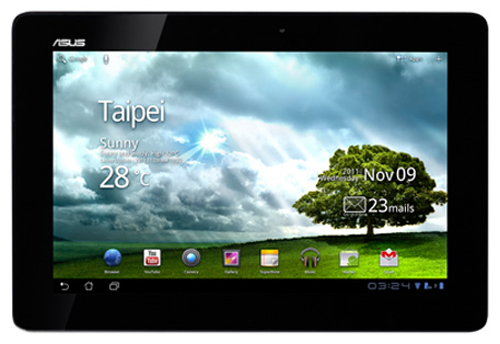
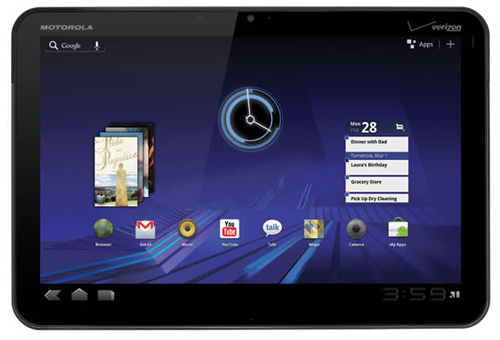
I had a quick look at the market back in late 2011 and here’s how I made up my mind. First, I focused on the main ~10 inch tablets of the market. This included, for instance, the Motorola Xoom, the Asus Transformer and the Apple iPad 2.

Orientation

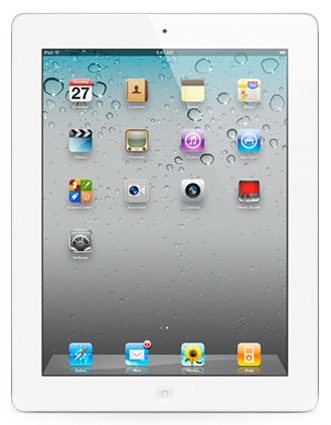
Can you see the most obvious difference between the iPad and the other two?

I made it easy for you by showing the iPad in the vertical position, because that’s its natural position: the home button is at the bottom, and the front camera is at the top. In constrast, the other tablets’ natural position is horizontal, with their front camera and power/sleep buttons placed accordingly.

Since reading a comic-book happens almost always in portrait mode, I figured I’d might as well choose a device that’s also designed for that orientation, if possible.

Aspect Ratio

Another important spec for me was the aspect ratio. The iPad has a 4/3 ratio whereas pretty much every other tablet on the market has a widescreen ratio, most of the time 16/10 (which is the case for the Xoom and Transformer).

I don’t know about you but holding a widescreen device vertically just feels wrong to me – it’s too narrow and too high, like I’m reading a mutated book. It’s entirely subjective, of course, and you may not mind at all.

Display Size

Of course, there’s the matter of effective size of the display. Assuming a vertical orientation, here are the pixel densities and screen sizes of each tablet:

  • Xoom: 160ppi, 12.7cm x 20.3cm.
  • Transformer: 149ppi, 13.6cm x 21.8cm.
  • iPad 2: 132ppi, 14.7cm x 19.7cm.

A standard American comic-book is 17cm x 26cm, so no tablet comes even close to reproducing that real-world reading experience (I wish somebody would make a bigger tablet!), but you can still figure out which one gives the best reading experience.

Here is a comparison of all 3 tablets’ screens (black borders indicate parts of the screen that would not be covered by the comic-book page):

The Xoom and the Transformer have the same resolution, which is higher than the
iPad’s, and it’s obvious you’d get a finer picture on them. However, if you
scale the screens so that they match their relative physical world size, here’s
what you get:

Here you can see that a comic-book displayed on a Xoom would be pretty much the same size as on the iPad – sure, you would get a better picture thanks to the higher resolution, making reading captions slightly more possible, but not any more comfortable without zooming a bit. The Transformer is clearly better here: the displayed page is bigger and it’s got a higher resolution to back it up.

Final Choice

With digital comics as the only requirement for your choice of tablet, the Asus Transformer Prime is the winner for me. However, I also had some secondary requirements:

  • Help me get through my RSS feeds more efficiently.
  • Let me read my Instapaper queue in a comfortable way.

The sad thing is that Flipboard, on iPad, really blew my mind for reading RSS feeds, and there’s no good Instapaper client on Android yet. It was a tough choice, as I went back and forth for a long time between the iPad and the Transformer, but I picked the iPad in the end. I figured that the loss in the comic-book reading experience was not too bad compared to the significant advantages I would get on my other use-cases.

There was of course the issue of my control over the device – something that always annoys me with Apple products (I ditched my iPhone for a Galaxy S Captivate because of that). But given my requirements, it wasn’t such a problem: both digital comics and RSS feeds are managed on the cloud, and most other applications did a good job of working around Apple by supporting 3rd party services like Dropbox for storage and syncing. If you have secondary requirements involving heavier stuff like music or video and you don’t like to play (pay?) by Apple’s rules, you may again want to choose the Transformer.

Spending the money on the tablet was not too hard. I sold some of my collection (mostly single issue series I either planned to replace with TPBs, or get rid of altogether), and that alone pretty much paid for it. That’s how much comics surplus I have in my home, begging to get uncluttered through the sweet release of digital media!


The Journey to Digital Comics

You may have noticed that, a couple months ago, I bought myself an iPad 2 as an early Christmas present. This was the result of some market research based on a few requirements I had for my next big household change: transition from paper comics to digital comics.

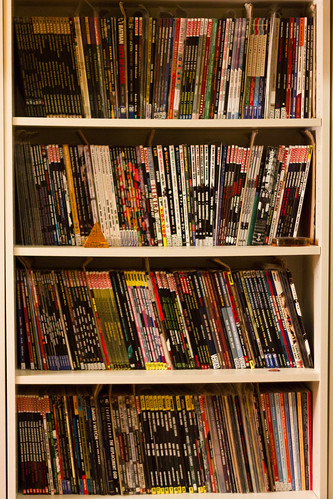
The incentive to start reading digital comics was pretty obvious: after moving my music, movies, TV shows and books to the digital world, it was only a matter of time before I would do the same with my comics. Sure, just like I still like to own some books in physical form, I will still buy some of my comics at my friendly local store, but, realistically speaking, more than two thirds of my collection is just enjoyable stuff I don’t care so much about – I want to read it, but the book itself is not especially beautiful, and it’s not something that would impress my guess when they spot it on the shelves.

IMG_5680.jpg

For me, going digital is all about reclaiming space and uncluttering the house where it makes sense.

As a result, here’s my “Journey to Digital Comics”, in the tradition of Mike Vardy’s “Journey to…” series:

  1. The Journey to Digital Comics: Reading Device
  2. The Journey to Digital Comics: US Comics Apps
  3. The Journey to Digital Comics: Manga Apps
  4. The Journey to Digital Comics: Pros and Cons
  5. The Journey to Digital Comics: On Ownership and Stuff
  6. The Journey to Digital Comics: Conclusion

Edit: it turns out there’s a lot more to say than I expected, so I expanded the series a bit.


Abandoning Remember The Milk

The milkify.com domain recently expired, and I didn’t really feel like renewing it. If you look at the (absence of) recent commits in either IronCow or Milkify, it’s easy to understand why: I’m not really working on those projects anymore. And that’s because I’m not using Remember The Milk anymore either.

To be fair, IronCow is pretty stable already – most of the latest changes were configuration management stuff and upgrades to Visual Studio 2010 – so it’s still usable. I’ll be available for bug fixes, of course, but if the guys at Remember The Milk add new features, I would probably not know about it and it wouldn’t be ported to IronCow unless somebody forks the project and submits a patch.

Milkify, however, won’t see any improvements unless somebody picks it up. It’s just not worth it to work on a tool I’m not using myself.

This means I get more time to focus on my new home projects like PieCrust and a couple of other bigger ones in progress.


Simple workaround for the iPad’s smart cover’s design flaws

I recently got an iPad (more on this later), and with it I got the much hyped smart cover.

IMG_4353.jpg

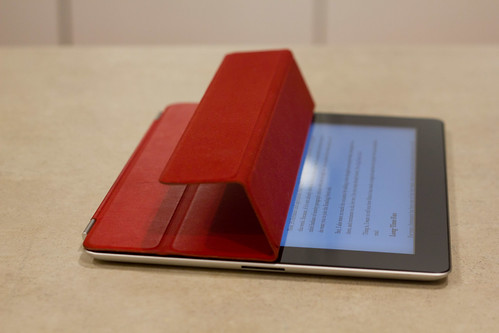
I loved the simplicity of it, and how quickly you can take it off and put it back on again… However, I quickly realized that I probably had more dust on the screen while using that thing than if I didn’t have any cover at all. Among the problems I had the infamous “dust lines” – those three lines you get on the screen at exactly the same spot as the cover’s folds.

The problem was pretty obvious: the natural way to fold the cover, and the way Apple advertises it, is as follows:

IMG_4357.jpg

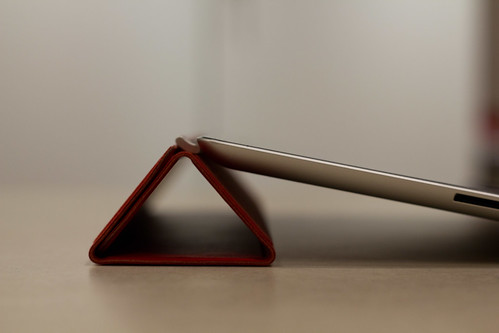
But this results in the following situation:

IMG_4354.jpg

The iPad rests on the folded cover as expected, but the outer faces of that triangular stand are the faces that go against the screen when the cover is closed! They would therefore pick up dust and other particle directly from the table and all around, and put them back onto your screen as soon as you walk away… I don’t know where Steve Jobs used to go with his iPad, but my house is not always spotless clean, and neither are any restaurant tables or office desks that I want to put my iPad on.

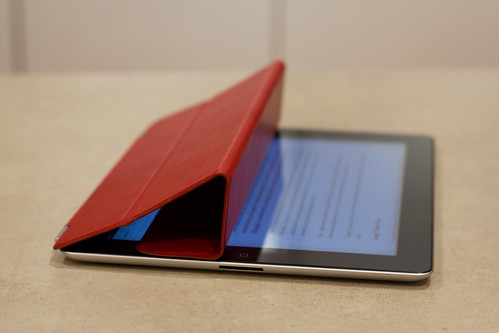
An easy workaround for this problem is to fold the cover the other way:

IMG_4355.jpg

This way, the faces that go against the screen are actually inside the triangular stand, where they’re very unlikely to pick up any dust. This way of folding is a lot less intuitive, but once you get the hang of it, you can actually close and open it as fast as before. I haven’t had much dust on my screen ever since I started using this technique.

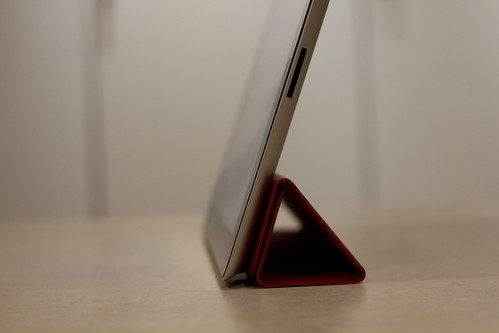
There’s just one big caveat to this workaround: it doesn’t work with the “stand up” mode.

IMG_4358.jpg

If you look closely at the picture above, you’ll notice what’s wrong: gravity alone can unfold the cover and make your iPad fall down on the table. In my case, the magnetic strength of the cover is barely enough to counteract the iPad’s weight and make it stand on its own, but the slightest touch can make it crumble down like a house of a couple of very expensive cards. However, I don’t care because I’ve never felt the need to use that position so far.


PHP is fucked up

You may be shocked by what I’m about to say but here it is: PHP is fucked up.

Well, duh

Oh, no. Wait. No you’re not shocked. You already knew it.

Today’s topic: namespaces.

PHP’s namespace implementation is fucked up. There’s really no way to say it nicely, and you will realize it 5 minutes after starting to use them, when most of your code breaks and you need to litter the beginning of your files with use statements and you really wonder what you gained in the process. It really comes down to the impossibility to import a whole namespace, and PHP’s inability to look into parent namespaces when a class is not found in the current one. Sure, I understand the first feature is actually very tricky in a dynamic language, and the second one may have been rejected because of performance reasons, but with that many downsides you have to wonder why namespaces were implemented at all. Pornel gives a good list of all those downsides in his article on PHP namespaces.

Sure, namespaces let us get rid of the PEAR naming conventions, and they work nicely with spl_autoload_register, but they also gave me my biggest WTF moment in recent history.

Consider the following code:

namespace Foo;

class BarException extends Exception
{
}

class Bar
{
	public function trySomethingSafe()
	{
		try
		{
			throw new BarException("Catch this!");
		}
		catch (Exception $e)
		{
			echo "Caught exception: ".$e->getMessage();
		}
	}
}

It defines a new exception type (FooException), and a class (Bar) that does something safe by wrapping the code of the function inside a try/catch statement.

Now run this from another file:

require_once 'foobar.php';

$b = new FooBar();
try
{
    $b->trySomethingSafe();
}
catch (Exception $e)
{
    echo "This should never show up, right?";
}

Well, guess what you get in your output window? Yep:

This should never show up, right?

It’s like the first try/catch block is not catching the exception! Surely it can’t be a bug in the PHP runtime, right?

Well, of course not. It’s the user’s fault. And that’s because PHP’s namespaces suck ass.

Look at the catch statement in trySomethingSafe: it’s meant to catch all types of exceptions by specifying the top parent Exception type, but this is actually not it. See, that code is inside namespace Foo, and I didn’t specify either a use Exception at the top of the file, nor did I use Exception’s full name, Exception. Yes, that leading backslash is really super important in this case, because it makes all the difference between what you meant (the standard Exception type) and what PHP understands (a completely imaginary FooException type).

To fix the problem, replace the catch clause in trySomethingSafe with this:

catch (Exception $e)

You will then get the expected result:

Caught exception: Catch this!

The tricky thing here is that PHP doesn’t seem to care that FooException doesn’t exist. It happily runs the script, gets the exception, which is of type FooBarException, figures out that the class name does not equal to FooException, and bubbles the exception up the call stack. It doesn’t stop to check that the exception type we want to catch actually exists.

So, yeah. You need to be careful with PHP namespaces, especially when you add them to a previously un-namespaced project.


From Archos to Amazon

As you probably already know, Amazon’s tablet, the Kindle Fire, was announced a few days ago. Priced at a pretty amazing $199, its purpose is more focused than your general usage tablet like the iPad or the Xoom: it’s specifically designed for consuming content like books, music and video (preferably through Amazon’s own services, of course). Although it will probably be possible to install some other apps (through Amazon’s AppStore) to do some email and chatting and gaming and what have you, it will probably be more limited than on those bigger tablets, and will likely be only advertised as the last bullet point on the list of specs, if at all.

Now you know what else was priced around $200 and was useful mostly for consuming content like books, music and video? Yep. The Archos 70 I got last year for $249 (I got it on a discount, it was normally at $279).

Oh sure, Archos may not have been advertising their product like that. They may have advertised it along the lines of:

The most awesome Android tablet ever! Do everything you want! Web browsing! Videos and music! Email!! Games!!! Video chat!!!! This is so awesome we’re running out of exclamation marks!!!!!

Being a long time Archos user, I’m used to their bullshit and I know how to read through it. It usually translates to:

It’s rubbish at everything, especially anything web-related, but it can read any fucking video format in the universe, doesn’t come with any bullshit iTunes-like sync program, and is so much cheaper than the competition.

And as I stated last time, that was just perfect: I only wanted a good portable media player, and maybe a nicer way to read my Instapaper clips. But, of course, everytime somebody saw my small cheap looking tablet, there was a good chance the discussion would go like this:

  • “What’s that?”
  • “My Archos 70. Android tablet. I use it mainly as a portable media player, though.”
  • “Why didn’t you get an iPad?”
  • “Too big. Not enough codec support. Too expensive.”
  • “Yeah but you can do so much more with it!”
  • “Don’t care.”
  • “Come on! Apple is so awesome! The iPad is so shiny!”
  • “Yeah, whatever.”

Well it looks like Amazon found a lot of people like me out there because the Kindle Fire’s product story is exactly what I was looking for a year ago. Well… apart for that one small detail about data freedom, because I’m not sure exactly how easy it will be to get your own content onto the device, without necessarily going through Amazon (especially since most of their content is not even available outside of the U.S. anyway).

At least I’m very happy to see someone try to move the market into a slightly new direction instead of spitting out confusing all-purpose Android tablets like everyone else.