Ramblings of General Geekery

Formatting mongo output

If you’re working with MongoDB’s mongo command line tool and you often see yourself reading through this:

> db.contactInfos.find({"source":ObjectId("4e39da93058cfe28a039b546")})

{ "_id" : ObjectId("4e6e9a9f058cfe01dc1bcded"), "source" :ObjectId("4e39da93
058cfe28a039b546"), "sourceId" : "754731", "sourceUserName" : "loudej", "ful
lName" : "Louis DeJardin", "description" : "A software guy on the ASP.NET te
am and author of Spark", "avatarUrl" : "http://a2.twimg.com/profile_images/1
161371928/DSC01367_normal.jpg", "websiteUrl" : "http://louis.dejardin.org",
"location" : "Kenmore, WA", "friendCount" : 97, "followerCount" : 1428 }
{ "_id" : ObjectId("4e6e9a9f058cfe01dc1bcdf3"), "source" : ObjectId("4e39da9
3058cfe28a039b546"), "sourceId" : "16925866", "sourceUserName" : "sebastienr
os", "fullName" : "Sébastien Ros", "description" : "", "avatarUrl" : "http:/
/a1.twimg.com/profile_images/1074060902/f71ee9e786d8340a5eb08dd6154c2095_1__
normal.jpeg", "websiteUrl" : "http://about.me/sebastienros", "location" : "S
eattle", "friendCount" : 18, "followerCount" : 142 }
{ "_id" : ObjectId("4e6e9a9f058cfe01dc1bcdf4"), "source" : ObjectId("4e39da9
3058cfe28a039b546"), "sourceId" : "768197", "sourceUserName" : "haacked", "f
ullName" : "Phil Haack", "description" : "This bio is not true.", "avatarUrl
" : "http://a2.twimg.com/profile_images/1315393964/image_normal.jpg", "websi
teUrl" : "http://haacked.com/", "location" : "Bellevue", "friendCount" : 225
, "followerCount" : 15947 }

…then you may want to add toArray() at the end of your line:

> db.contactInfos.find({"source":ObjectId("4e39da93058cfe28a039b546")}).toArray()

[
    {
        "_id" : ObjectId("4e6e9a9f058cfe01dc1bcded"),
        "source" : ObjectId("4e39da93058cfe28a039b546"),
        "sourceId" : "754731",
        "sourceUserName" : "loudej",
        "fullName" : "Louis DeJardin",
        "description" : "A software guy on the ASP.NET team and author of Spark",
        "avatarUrl" : "http://a2.twimg.com/profile_images/1161371928/DSC01367_normal.jpg",
        "websiteUrl" : "http://louis.dejardin.org",
        "location" : "Kenmore, WA",
        "friendCount" : 97,
        "followerCount" : 1428
    },

    {
        "_id" : ObjectId("4e6e9a9f058cfe01dc1bcdf3"),
        "source" : ObjectId("4e39da93058cfe28a039b546"),
        "sourceId" : "16925866",
        "sourceUserName" : "sebastienros",
        "fullName" : "Sébastien Ros",
        "description" : "",
        "avatarUrl" : "http://a1.twimg.com/profile_images/1074060902/f71ee9e786d8340a5eb08dd6154c2095_1__normal.jpeg",
        "websiteUrl" : "http://about.me/sebastienros",
        "location" : "Seattle",
        "friendCount" : 18,
        "followerCount" : 142
    },
    {
        "_id" : ObjectId("4e6e9a9f058cfe01dc1bcdf4"),
        "source" : ObjectId("4e39da93058cfe28a039b546"),
        "sourceId" : "768197",
        "sourceUserName" : "haacked",
        "fullName" : "Phil Haack",
        "description" : "This bio is not true.",
        "avatarUrl" : "http://a2.twimg.com/profile_images/1315393964/image_normal.jpg",
        "websiteUrl" : "http://haacked.com/",
        "location" : "Bellevue",
        "friendCount" : 225,
        "followerCount" : 15947
    }
]

Much more readable, isn’t it? The only problem is that mongo will, by default, return only the first 20 hits of a query (it will write “has more” at the bottom to indicate that, well, there’s more). The toArray() method, however, will get everything and print it out. This could mean printing a lot of stuff, so you may want to stick a limit(20) in between if you’re not sure:

> db.contactInfos.find({"source":ObjectId("4e39da93058cfe28a039b546")}).limit(20).toArray()

Don’t brick your ReadyNAS

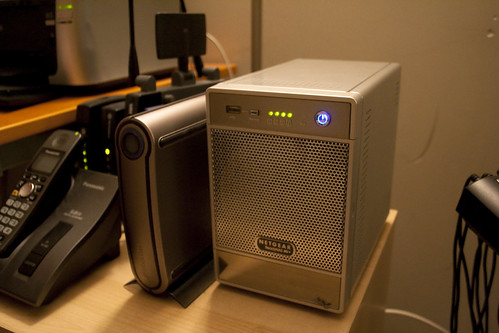
I have a ReadyNAS NV+ at home to store most of my data and I’ve been pretty happy with it so far… except for one thing: although it’s running a flavor of Linux that you can access as root user (if you installed the EnableRootSSH add-on), you can’t do everything you would normally do with a Linux box.

File Server

First, like most pre-2010 consumer grade NASes, the NV+ runs on a sparc CPU, so there’s a lot of packages you don’t have access to unless you recompile them yourself. And that’s fine, if you know you’re going to waste your whole evening figuring out weird broken dependencies and compile errors. But, second, there’s some custom stuff in there, I don’t know what it is, but it basically prevents you from even upgrading to newer versions of some of the packages you do have access to. This means: don’t run apt-get upgrade on an NV+.

Let me repeat that: don’t run apt-get upgrade on an NV+. Ever.

What happens when you do it is that you lose SSH access, the web administration interface stops working, some of your network shares become inaccessible, and half of your left socks magically disappear. I know, I did it twice in the past (yes, I’m stupid like that).

In both cases, I was lucky enough to recover from my mistake by performing an OS reinstall. It keeps all the packages, add-ons and configuration settings you had before, and only resets the admin password to netgear1 or infrant1 (depending on the version of RAIDiator you had installed), so it almost works again right away afterwards. The downside is that if what fucked up your NAS was one of those add-ons or packages, you wouldn’t have any other option than to do a factory reset and recover your data from a backup (you at least have daily automated backups, right?). But in my case, I think it was one of the OS libraries (like glibc or something) that was causing the issue so that’s where I got lucky. Twice.

Those are the only problems I ever had with that box, so overall I’m still happy to own it. The X-RAID that comes with it makes life a lot easier (you can hot-swap disks, and you can mix different disk sizes), and the machine is small and pretty quiet (my external backup disks are louder). Unlike my media center PC, I wouldn’t have much fun trying to build my own NAS, I think.

…but DON’T RUN APT-GET UPGRADE!


IEnumerable is awesome

I’ve always thought that one of the most underrated features of C# is the yield statement and its companion, IEnumerable<T>. It may be because I’m working a lot with people coming from an exclusively C++ background – it takes some time to adapt to a new language with new paradigms, especially when that language can look a lot like “C++ without delete!” at first. But there are so many wonderful constructs in C# (especially in the past couple versions) that it’s a shame when people keep writing code “the old way”…

That’s why I’m going to write a few “101” articles I can refer my co-workers to (hi co-worker!).

It starts (after the jump) with how yield+IEnumerable is awesome.

The yield statement

The yield statement allows you to write a pseudo1 coroutine specifically for generating enumerable objects (which is why it is sometimes called a “generator”). The first beauty of it is that you don’t have to create the enumerable object itself – it is created for you by the compiler. The second beauty is that this generator will return each item one by one without storing the whole collection, effectively “lazily” generating the sequence of items.

To illustrate this, look at how the following piece of code will generate the all time favorite Fibonacci sequence.

public static IEnumerable<int> GetFibonacciSequence()
{
    yield return 0;
    yield return 1;

    int previous = 0;
    int current = 1;

    while (true)
    {
        int next = previous + current;
        previous = current;
        current = next;
        yield return next;
    }
}

The awesome thing is that it’s an infinite loop! It would obviously never return if the function didn’t behave like a coroutine: it returns the next number to the caller and only resumes execution when the caller asks for another number. It’s like you’re “streaming” the Fibonacci sequence!

You can stop any time you want. For instance:

int count = 20;
foreach (int i in GetFibonacciSequence())
{
    Console.WriteLine(i);
    if (--count == 0)
        return;
}

Or, even better, using some of LINQ’s extension methods:

using System.Linq;
foreach (int i in GetFibonacciSequence().Take(20))
{
    Console.WriteLine(i);
}

Performance Gains

There are many advantages to using the yield statement, but most C++ programmers are not really swayed by arguments of coding terseness and expressivity, especially when it involves “black magic” going on inside the compiler2: they usually mostly, err, yield to performance related arguments (see what I did, here?).

So let’s write a simple program that generates many “widgets”, each 256 bytes in size, and print the peak memory usage:

class Widget
{
    private byte[] mBuffer;

    public Widget(int size)
    {
        mBuffer = new byte[size];
    }
}

class Producer
{
    // The old, classic way: return a big array. Booooorriiiiing.
    public IEnumerable<Widget> ProduceArray(int count, int widgetSize)
    {
        var widgets = new Widget[count];
        for (int i = 0; i < count; i++)
        {
            widgets[i] = new Widget(widgetSize);
        }
        return widgets;
    }
    
    // The new funky, trendy, hipstery way! Yieldy yay!
    public IEnumerable<Widget> ProduceEnumerable(int count, int widgetSize)
    {
        for (int i = 0; i < count; i++)
        {
            yield return new Widget(widgetSize);
        }
    }
}

class Program
{
    static void Main(string[] args)
    {
        int size = 256;
        int count = 1000000;
        ProduceAndPrint(false, count, size);    // LINE 7
        Console.WriteLine("Generated {0} widgets of size {1} (total size = {2})", count, size, count * size);
        Console.WriteLine("Memory Peaks:");
        var process = Process.GetCurrentProcess();
        Console.WriteLine("Virtual MemoryttPaged MemoryttWorking Set");
        Console.WriteLine("{0} Mbtt{1} Mbtt{2} Mb", process.PeakVirtualMemorySize64 / 1024, process.PeakPagedMemorySize64 / 1024, process.PeakWorkingSet64 / 1024);
    }

    static void ProduceAndPrint(bool useEnumerable, int count, int widgetSize)
    {
        var producer = new Producer();
        if (useEnumerable)
        {
            int i = 0;
            foreach (var w in producer.ProduceEnumerable(count, widgetSize))
            {
                ++i;
            }
        }
        else
        {
            int i = 0;
            foreach (var w in producer.ProduceArray(count, widgetSize))
            {
                ++i;
            }
        }
    }
}

This prints, on average:

Generated 1000000 widgets of size 256 (total size = 256000000)
Memory Peaks:
Virtual Memory          Paged Memory            Working Set
488572 Mb               299544 Mb               293100 Mb

Now, on line 7, change false into true. This will make the Producer return a yield-enumerated bunch of widgets, instead of returning a big array. This prints:

Generated 1000000 widgets of size 256 (total size = 256000000)
Memory Peaks:
Virtual Memory          Paged Memory            Working Set
133564 Mb               14156 Mb                12984 Mb

Woohoo! That’s almost 4 times less virtual memory used, and a 25 times smaller working set! All of this because the garbage collector can now kick in during the enumeration and discard some of the widgets we’re not using anymore. You can actually print the number of garbage collections triggered using GC.CollectionCount(0) (all those widgets will be in generation 0 because they’re short lived). In the first case (returning the full array of widgets) I usually get 49 collections. For the second case (returning widgets one by one) I usually get 66 collections.

Of course, you may get frightened by all those garbage collections that would slow down your loop (C++ programmers are easily scared by garbage collectors), and that’s a legitimate concern if you’re writing a real-time ultra-sensitive application (although you’d have to check first that it would indeed be a problem). But for other kinds of applications, it can be a real life-saver – like for instance when you’re fetching huge amounts of data from a database of some sorts, and although each piece of data fits in memory, the whole batch doesn’t.3

More!

If you want more meaty stuff on all this, I recommend reading Raymond Chen’s series: part 1, part 2, part 3 and part4. You can also have a look at the fun traps that await you as told by Eric Lippert: part 1 and part 2.


  1. “pseudo” because the actual compiler-generated implementation uses a simple state machine. ↩︎

  2. It’s not even all that black, since you can easily look at the generated code, but it does feel magical! ↩︎

  3. This is obviously supposing you don’t have referencing between each item, but even then you could use additional lazy-loading and caching to still only have a subset of your whole dataset in memory. ↩︎


XBMCFlicks in Canada

I recently cut the cord, as they say, giving up cable TV in favor of Netflix and generally doing more productive things otherwise (which is easy since Netflix up here in Canada doesn’t have nearly as much content as in its home country). The problem was then to figure out how to access Netflix’s streams at home.

The web interface works well enough but is obviously not suited for using from the couch (even with that very handy Rii remote). The other official options are devices that I don’t have, except for the Xbox360 and the Wii. I haven’t tried it on the Wii yet, but I know I certainly don’t want to use my Xbox360 since it’s loud as hell and I’d need to wait for it to boot up before I could watch anything… so I went the unofficial route, as it’s often the case with guys like me.

I started with Boxee, since it’s a lot better than XBMC when it comes to apps and its Netflix app looks very nice. The problem was that it’s only supported in the US at the moment (except on the Boxee Box itself). I tried tweaking the app’s code to make it work in Canada and eventually got that somewhat working, but it was a lot more effort than what I expected (maybe I’ll post about that later if I get it in a state I’m happy with, unless the Boxee guys actually release an update that fixes the problem). Still, it was a nice way to keep Python programming fresh in my mind.

I then reverted back to XBMC, which I’m a big fan of, and its XBMC-Flicks add-on, which lacks style but is at least functional and supports Canada. Still, there were a few blocking issues so I had to go in the code and change a few little things. I uploaded my fork on Github, so you can grab it from there and try it for yourself if you’re a canadian XBMC/Netflix user. Those fixes should be integrated into the offical add-on soon anyway.


Little wireless keyboard

A couple months ago I made a new addition to my home entertainment setup: a little wireless keyboard named “Rii”:

IMG_2006.jpg

It’s a lot more practical to use than my previous Logitech wireless full size mouse and keyboard combo because it’s so easy to grab, do something quick, and toss away (e.g. restart a program, copy or move a few files, type a search query, etc…). Obviously it’s not as good if you want to do anything that takes more than a minute, so in that case what I do is use my living room laptop (a Macbook Pro that’s always sitting on the coffee table) to either remote desktop into the HTPC or control it with Synergy.

Thanks to Eddie for showing me this little gem!


Poor man’s search engines sync for Google Chrome (version 2)

After receiving some feedback, I’ve updated my scripts for syncing the search engine settings in Google Chrome. You can grab the new ZIP file here.

Here are the changes:

  • I’ve written some native CMD.EXE scripts for Windows, which are easier to run than the Powershell ones for non dev people (or devs that never used Powershell).
  • The scripts have been renamed to “export” and “import” since most people don’t get the “push” and “pull”.
  • The “import” script creates a backup of the settings files (a file called “Web Data.backup” in the same directory) so you can revert to the previous version if something goes wrong.

Enjoy!


My new shiny toy: the Archos 70

Tablets, and especially Android tablets, are going to be all the rage this year, with more new tablets announced every week than Lindsay Lohan had rehabs. Because I’m a geek with money to waste on unneeded electronics, I’ve decided to be part of the early adopters with my new shiny toy, the Archos 70.

IMG_2022.jpg

I would have usually waited on more mature tablets, along with a more mature version of Android (hopefully Honeycomb), but there are a few reasons I jumped on this one:

  • I’ve been a relatively faithful user of Archos’ previous portable media players (I’ve owned 2 other devices of theirs in the past, the AV500 and the 1st gen Archos 5).
  • The Futureshop warranty on my Archos 5 was about to expire, so I returned it and cashed in its retail value as a gift card in order to upgrade to the latest model “for free”.
  • I need a portable video player first, and a tablet second, so I don’t care much if the tablet experience is not so good.
  • I’m not playing games on my phone, and I don’t intend to play games on my tablet either.

Reading through Engadget’s review of the Archos 70 and his big brother the Archos 101, all I can say is that it’s a pretty fair review. If you don’t want to read the whole thing, the conclusion is that although those devices are clearly not as good as the Galaxy Tab or the iPad, for less than half the price there’s really nothing you can complain about. I’d go as far as saying that the price/quality ratio is actually higher on the Archos 70. This is especially true when compared to the Galaxy Tab, because this one is bound to be obsolete very soon (if it’s not already by the time I finish writing this) – at least the iPad features an OS and apps that are very well designed for the tablet format and are already quite mature.

Now there’s a few things I’d like to add to Engadget’s review, because I think they didn’t highlight some of the things the Archos 70/101 are doing better than the competition.

Body Design

Archos has been until now mostly a portable media player manufacturer, and it shows in the Archos 70. First, the device has a widescreen aspect ratio, unlike the big shots out there. This means that when watching movies and recent TV series, you will have smaller black bars around the screen, if any at all. For example, this is it playing Dirty Harry… See? No bars, no cropping. Just full-screen bad-assery.

IMG_2037.jpg

Speaking of the screen, it’s bright enough that you can watch videos outside to some degree, but it’s not as good as the iPad or Galaxy Tab screens, obviously. The view angles are particularly pretty horrible, but I don’t think it’s a big deal because it’s not like you can cram several people in front of a 7 inches screen anyway. For personal use, it’s “good enough”.

Second, the device has a built in stand you can unfold in the back. It’s very useful if you’re watching something while doing something else, like eating or cleaning your camera lenses or whatever. Way better porn watching experience, too 🙂
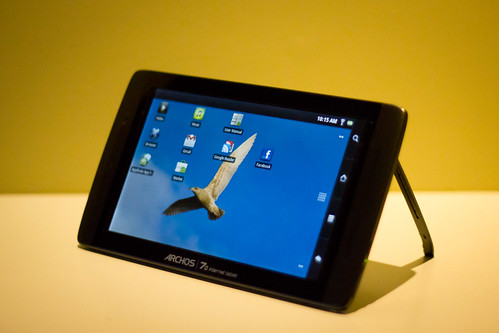
IMG_2028.jpg

The stand itself is cheap plastic and feels a bit fragile, so I wouldn’t be surprised if some people broke it at some point (which would suck).

By the way, I was expecting something bad in terms of device body after reading Engadget’s review, but it turned out okay in my opinion. It sure doesn’t feel as nice and solid as an iPad, but it doesn’t feel like a Playskool toy either. And I dropped it a couple times already and it’s completely fine (unlike an iPhone 4…). True to Archos’ tradition, however, the power and volume buttons on the side are a bit wobbly, and I expect them to be the first thing that breaks down. I wish they would learn to make sturdier buttons…

Another thing Engadget mentioned already, but it’s good to mention it again, is how thin that tablet is. It’s almost 50% thinner than the iPad. See how it’s even thinner than my iPhone 3G:

IMG_2027.jpg

It’s also super light. Archos says it’s 300 grams, which is less than half the iPad’s weight (although that’s not fair since the iPad is way bigger, with a 10 inches screen). My point is that it’s just a bit heavier than a Kindle 3 (at 250 grams), so it feels pretty natural to hold the Archos 70 in one hand while riding the bus or the subway. This is perfect for me since that’s where I watch most of my videos with it.

Media Playback

Another thing Archos is famous for is releasing devices that can read all the major (and even some minor) audio and video codecs. These tablets are no different, and so far anything I’ve thrown at it has been playing fine without the need for transcoding. Also, and that’s a big feature for me, the device appears as an external USB drive when you connect it to your computer – no need to go through some painful piece of software like iTunes. And you don’t even have to connect it at all since you can put stuff on an external mini-SD card (not included). Like any other Android device, it will scan the SD card when you mount it back and all the media that’s on it will be available. Hell, you can even just push stuff on it wirelessly with FTP or any other Wi-Fi syncing app. You’re free! Yay!

Speaking of Wi-Fi, the Archos 70 does a good job of integrating with your home network. The custom Video Player app can not only read local media, but also media from your SMB shares or your UPnP servers.
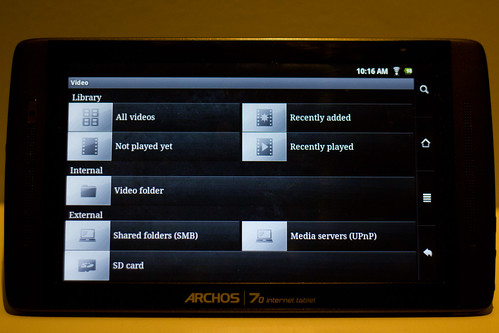
IMG_2030.jpg

If I want to finish watching some TV series episode in bed before going to sleep, I can stream it from my NAS or my XBMC box downstairs. The only thing that wouldn’t play was uncompressed rips of Blu-Ray movies (we’re talking 25 to 30 Gb HD video files, here!). I would get this error message:

IMG_2031.jpg

The rest would play smoothly across Wi-Fi. Here’s Serenity streaming from my NAS. I can even switch/toggle the audio or subtitle tracks and all that jazz.

IMG_2035.jpg

Applications

The main thing that kinda sucks about applications on the Archos 70 is how Archos decided to not install the Google Market, or any of the Google applications. That was probably to avoid having to get the device certified by Google or something, but still, it’s pretty lame. Instead, they want the user to go through some other market, AppsLib, which is decent (it has quite a lot of applications) but, well, is only a subset of the main Google Market.

Thankfully, and because we’re talking about Android here, people hacked the device pretty quickly. Archosfans was, I think, the first to offer an APK of the official market app, and that’s what the Engadget guys point you to, but now I recommend using the one from XDA. In both cases, it’s super simple: you just download a file and launch it with the built-in file browser. Once that’s done, you can get GMail and Google Reader and whatever you feel like downloading. You can even run AppBrain and copy all the apps you already have on your phone, if you have an Android phone. You’re free! Yay!

Performance

I don’t care much about performance, since I’m not using the tablet for anything heavy like gaming or whatever, but in case you’re curious, here it is. I ran the Quadrant Benchmark on it and got a score of 1271 without tweaking anything on the device (e.g. it still had applications running in the background and all that).
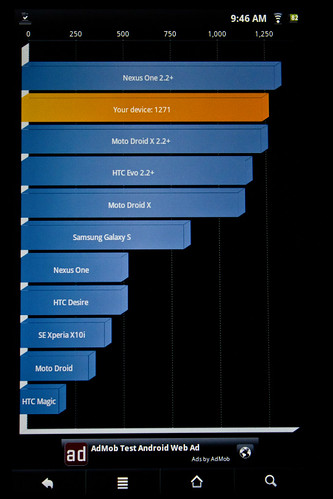
IMG_2074.jpg

People around the web can get scores around 1500 and more (above the Nexus One running 2.2) by killing all running apps and setting the “Power Management” to “Overdrive” in the system settings. Now, benchmarks like these don’t mean much, I know. For example the OS version alone seems to play a big part in it (see the difference between the Nexus One running 2.1 and 2.2 on the previous screenshot?). But at least it gives a rough idea of where the Archos 70 falls in terms of performance.

Just for laughs I installed a few well known games like Angry Birds or X Construction Lite and they ran very smoothly. Some people reported, at first, that a few games were unplayable, but it looks like it got fixed when Archos released the 2.0.71 firmware. And if you’re looking for serious speed and power, the XDA guys have already released a few custom kernels for the Archos tablets, some of which feature CPU overclocking.

Conclusion

So far I’m quite happy with my new toy, and the only thing I’m worried about at this point is how long it’s going to last – Archos usually cuts costs with cheap builds that tends to break or malfunction after a couple years (but then again, my Apple devices haven’t lasted much longer in my experience, although it’s usually for different reasons). I originally expected to only use it as a portable video player, ignoring most of the other features like I did with the Archos 5 (it had a web browser and all that, but the horrible resistive touch screen and crappy performance made it unusable for anything else than media playback). But it turns out the Archos 70 is a very nice tablet, and I find myself browsing the web, checking my email and social networks, and all that stuff more and more. For example it’s a pretty nice way to catch up on saved Google Reader or Instapaper articles before going to sleep. It’s also a very decent eBook reader.

It’s the best gadget I’ve bought since my first iPhone, although it’s mostly awesome because it’s so cheap. But still, it’s awesome.


Poor man’s search engines sync for Google Chrome

Update: since Lifehacker featured this post on their home page, I released some simpler updated version of the scripts here.

The wonderful thing about open-source software is that whenever something’s missing, anybody can go ahead and fix it… that is, unless nobody cares enough about it. And that’s precisely what’s happening with the “search engines sync” feature in Google Chrome, which has been in Chromium’s bug database for more than a year and a half. Looks like Google is not so much in a hurry to let you use other search engines as soon as you install a fresh copy of their browser.

Oh, don’t look at me. I seriously don’t have the time to dive into such a big codebase to add the feature myself… but what I do have the time for is a little scripted hack to get around the problem quickly!

Google Chrome, like a lot of programs these days, is using SQLite to store its data. Your search engines are stored in a database called “Web Data”, in a table called “keywords”. It’s quite easy to use the SQLite command line shell to export and import that table across your computers… so that’s what I did. There are 2 scripts: one to export, and one to import, although I called them “push” and “pull” to sound cool like the Git/Mercurial guys.

Windows

On Windows, my scripts are written in Powershell, which ships by default with Windows 7. On previous versions of Windows, Powershell ships with some service packs, so if you’re up to date you should have it. Otherwise, go get it from Microsoft’s website.

Update: if you’ve never run any Powershell script before, you’ll have to change the security settings because I didn’t sign my scripts. Run Powershell as an administrator and type “Set-ExecutionPolicy RemoteSigned”.

You’ll need to also download the SQLite command line shell (no install required, it’s just one .exe file in a zip). Just keep it next to the script files.

Here’s the export script:

param (
    [String] $Destination = "keywords.sql"
)

$CurrentDir = Split-Path -Parent $MyInvocation.MyCommand.Path
if (![IO.Path]::IsPathRooted($Destination)) { $Destination = [IO.Path]::Combine($CurrentDir, $Destination) }
$Destination = $Destination.Replace('', '/')
$TempSqlScript = "$env:TEMPsync_chrome_sql_script"

Push-Location
Write-Output "Exporting Chrome keywords to $Destination..."
cd "$HOMEAppDataLocalGoogleChromeUser DataDefault"
Write-Output ".output `"$Destination`"" | Out-File $TempSqlScript -Encoding ASCII
Write-Output ".dump keywords" | Out-File $TempSqlScript -Encoding ASCII -Append
& "$CurrentDirsqlite3.exe" -init $TempSqlScript "Web Data" .exit
Remove-Item $TempSqlScript
Pop-Location

And here’s the import script:

param (
    [String] $Source = "keywords.sql"
)

if ((Get-Process -Name chrome -ErrorAction SilentlyContinue | Measure-Object).Count -gt 0)
{
    throw "Close Chrome and try again..."
}

$Reply = Read-Host -Prompt "This will overwrite your Google Chrome search engines! Are you sure?  "
if (!($Reply -match "^(Y|y|YES|Yes|yes)$"))
{
    Write-Output "Cancelling operation."
    exit
}

$CurrentDir = Split-Path -Parent $MyInvocation.MyCommand.Path
if (![IO.Path]::IsPathRooted($Source)) { $Source = [IO.Path]::Combine($CurrentDir, $Source) }
$Source = $Source.Replace('', '/')
$TempSqlScript = "$env:TEMPsync_chrome_sql_script"

Push-Location
Write-Output "Importing Chrome keywords from $Source..."
cd "$HOMEAppDataLocalGoogleChromeUser DataDefault"
Write-Output "DROP TABLE IF EXISTS keywords;" | Out-File $TempSqlScript -Encoding ASCII
Write-Output ".read `"$Source`"" | Out-File $TempSqlScript -Encoding ASCII -Append
& "$CurrentDirsqlite3.exe" -init $TempSqlScript "Web Data" .exit
Remove-Item $TempSqlScript
Pop-Location

MacOS X

On MacOS X I’m using bash so all you need is to make sure you’ve got the SQLite command line shell. You can either download it directly, or use one of the package managers like MacPorts or Homebrew (I’m using the latter myself).

Here’s the export script:

#!/bin/sh

DESTINATION=${1:-./keywords.sql}
TEMP_SQL_SCRIPT=/tmp/sync_chrome_sql_script
echo "Exporting Chrome keywords to $DESTINATION..."
cd ~/Library/Application Support/Google/Chrome/Default
echo .output $DESTINATION > $TEMP_SQL_SCRIPT
echo .dump keywords >> $TEMP_SQL_SCRIPT
sqlite3 -init $TEMP_SQL_SCRIPT Web Data .exit
rm $TEMP_SQL_SCRIPT

And here’s the import script:

#!/bin/sh
if ps -x | grep -v grep | grep Google Chrome > /dev/null; then
    echo "Close Chrome and try again..."
    exit 1
fi

read -p "This will overwrite your Google Chrome search engines! Are you sure?  " -n 1
if [[ ! $REPLY =~ ^[Yy]$ ]]; then
    echo "Cancelling operation."
    exit 1
fi

SOURCE=${1:-./keywords.sql}
TEMP_SQL_SCRIPT=/tmp/sync_chrome_sql_script
echo
echo "Importing Chrome keywords from $SOURCE..."
cd ~/Library/Application Support/Google/Chrome/Default
echo DROP TABLE IF EXISTS keywords; > $TEMP_SQL_SCRIPT
echo .read $SOURCE >> $TEMP_SQL_SCRIPT
sqlite3 -init $TEMP_SQL_SCRIPT Web Data .exit
rm $TEMP_SQL_SCRIPT

Bringing it all together with Dropbox

Those scripts handle importing and exporting our search engines, but we’re missing the “sync” part so far. That’s where popular syncing service Dropbox comes into play (but you can do this with any other syncing service). Just put all this stuff (the SQLite command line shell, the scripts, and the database dump) in a Dropbox folder. All you have to do is run the “export/push” script after you’ve changed your search engines, and run the “import/pull” script next time you get on another computer. Dropbox will have synced the dumped database file (“keywords.sql” by default) in the meantime (unless you’re moving really super fast, in which case you’ll have to wait a second or two).

I’ve made a handy ZIP file with those scripts, a couple of bootstrap (double-clickeable) files for Windows, and the SQLite win32 command line shell. So download it and start syncing in a very hacky and lame way!