Ramblings of General Geekery

Piecrust 0.8.0

The 0.8.0 (and even 0.8.1!) version of PieCrust has been tagged in the stable branch.
mum's lemon meringue pie

As usual:

  • I still need to write some documentation on the new and/or changed features.
  • I’m really not good at keeping a single release focused around a small set of consistent new features. I tend to pack different unrelated features mixed with bug fixes as they come to me, and the result is a bit messy.

You can read about the changes in the CHANGELOG, or keep reading for a detailed description of the highlights. Or you can just go and grab it from BitBucket or Github and trust me that it’s awesome! (but wait, you should at least read the first couple sections here below because there are a few breaking changes).

New folder structure

As we get closer to a 1.0 release, I changed the folder structure to make it look more like a genuine application. It used to look like an already installed system (a _piecrust folder with the code and a sample website folder), which was nice during early prototyping and development. Now, however, it doesn’t feel right anymore, especially since chef has evolved into a sophisticated tool.

So the folder structure now has a bin folder with chef, the usual src, libs, tests folders, and a single piecrust.php file to include at the root.

For backwards compatibility purposes, the important files are also available at their old location (chef and piecrust.php) but they will issue a warning message if you use them from there. They will be removed when we hit version 1.0.

Broken stuff

There was a few things that didn’t quite make sense that I also fixed, unfortunately resulting in breaking changes:

  • When pretty_urls are disabled, pages with pagination will have the same first page URL as if they didn’t have sub-pages (e.g. foo/bar.html). Sub-pages will have URLs like foo/bar/2.html. This makes URLs more consistent.
  • PieCrust now supports extensions other than .html for pages. Before, you had to make all files in _content/pages with an .html extension, and use the content_type configuration setting in the header to change the output to something else, like .xml or .rss or whatever.
  • Now, you can actually create files like _content/pages/feed.xml and it will be handled correctly. This means content_type is now only meant for setting HTML response headers in CMS mode, which makes more sense.
  • Some chef commands had some inconsistently named options: some would have hyphens, some would have underscores, and some would just concatenate words together. I don’t know why I never noticed it until now… In most cases, the old option name is still available, but will issue a warning that it will be removed when we hit version 1.0.

Multiple formats

Thanks to the magic of open-source, PieCrust now also supports changing the format of a page right in the middle of the content. This is useful when you’re using a minimalist format like Markdown and just need that extra feature at one point to control some CSS or HTML property without having to write it all verbatim:

So here I am, writing some stuff. It's all _nice_ and _fun_.

But then, I need to write a boxed piece of text that will be laid out nicely with CSS. Let's use HAML!

<--haml-->
.boxed_text#tutorial1
  .left.column
    :markdown
      This is some **cool stuff** right here!
  .right.column
    :markdown
      Hey, this is nice too!

<--markdown-->
Ok, back to normal, now. **Whew!**.

This example obviously uses the PhamlP plugin (which adds the Haml and Sass languages), but you should get the idea.

Also, if you want to start a content segment using a different format than the one defined for the page, you can append the name of the format you want to use like this:

---newsegment:textile---
Another content segment using **Textile** formatting!

Templating features

The iterators obtained through pagination, blog.posts or link have a few new tricks:

  • You can sort posts and pages with a new .sortBy(foo) function. Here, foo is the name of a configuration setting in the pages’ or posts’ headers that will be used to order those pages or posts.
  • You can now access the content segments of pages and posts you’re iterating on – not just metadata like title and date.
  • You can use paginagion.all_page_numbers to get, well, all the page numbers for the current page. You can also use pagination.page(i) (where i is a number) to get the link to a specific page. This will help you build pagination footers more easily.

Portable baking

The --fileurls option to chef bake used to bake a website with absolute local paths for all links created with the pcurl family of template functions. This made it easy to just bake a site and double-click on the main page to preview it locally without any web server.

It was also flawed, because it meant the site could only be previewed in that exact place on the file-system – you couldn’t give it to a colleague or client to review.

A new option, --portable, effectively replaces the --fileurls option (which is now deprecated). It will create relative links (with lots of ../ in them) so that you can move the baked static files around and still have them previewable locally in a browser.

Debug info in CMS mode

For people running PieCrust in dynamic CMS mode, you can set site/enable_debug_info to false in the site configuration to disable the ?!debug feature, which could potentially expose private information to visitors.
Why PieCrust?

Recently I realized I’ve been working on, and talking about, PieCrust for quite a while, but I have never given any reason as to why on Earth I have written my own CMS and static site generator when there are so many already out there.

Like many open-source projects, PieCrust was born out of 2 very self-centered stimuli.

One: it’s fun to write new stuff!

And by “new”, here, I’m of course talking about things that were new to me at the time. Writing PieCrust, I learned a lot about web technologies, from HTTP servers to caching and proxies and whatnot.

With my next projects, I’ll learn a lot more – I’m looking at databases and scalability and security and other bigger, more complex things – but it was good to start with something simple and basic.

Two: everything else sucks!

Well, that’s not true, but you know what I mean. The average developer (and that includes me) is usually never happy with what’s available out there.

Most other static site generators are completely OK – they work well for the most part – but they have 2 flaws: they’re simplistic, and they’re doing it wrong.

Simplicity

Most other engines are too simplistic. They confuse simplicity with a lack of features. I believe you can have a fairly fully fledged static site generator without sacrificing how simple it is to use and work with.

Hopefully I succeeded with PieCrust. You tell me.

What the user does

Most other engines are built from the ground up to be static site generators. This means that when it’s time to preview your work in a browser, what they do is just re-generate the whole site and show the resulting HTML file matching the request. Thankfully, they do it incrementally, like a compiler, which means they only generate what was changed, but it’s not ideal unless you’re just looking at simple pages.

If you’re modifying a page with a lot of dependencies, that re-generation can take several seconds, which means you have to wait until you see your updated work. This happens, for example, when you’re working on a blog post that has various tags and categories: updating it means not only re-generating that post’s page, but also the home and/or archive page on which it appears, and all the relevant tag/category listing pages. Some static site generators take a few shortcuts here by not re-generating the whole site in that case, resulting in glitches in the preview.

This “compiler-like” approach works well when you always want the full result of the generation, but in the case of a user working on some content for his website, he only wants to see one page. You can only press F5 on one window at a time. So whatever dependencies a piece of content has, the engine should be able to just generate what the user wants to see. And this is what CMSes have been doing for a long time.

That’s why PieCrust is built from the ground up as a database-less CMS. Sure, it can generate a static site, but that’s just a side-feature. The focus is on what the user does the most (iterating between writing and previewing), and not what the user wants (a static website). What he wants happens later, once he’s done working.

The nice thing is that PieCrust ended up being both a good CMS (especially if you use it with a reverse proxy) and good static site generator (I’ll post some comparative benchmarks someday).


Piecrust 0.7.0

The new version of PieCrust has been tagged in the stable branch yesterday, and oh boy does it have some cool features. You can read about them in the CHANGELOG, or keep on reading for a more detailed presentation.

Rhubarbed Strawberry Daiquiri Tart Plated

Blog archives

Until now, if you wanted to display a list of posts on your website, you had to go through the pagination.posts variable, which has the nasty side-effect of generating pagination for the current page (i.e. the page would have as many sub-pages as needed to show all your posts, with some expected links like “next entries” and “previous entries” to navigate between them). You could of course use the single_page setting to prevent any sub-pages from being created, but that was a bit awkward, especially since you also probably wanted to tweak other things, like the number of posts to show.

Now there’s a more straightforward way with the blog.posts variable, which returns all your posts without any limit or filtering. It also doesn’t affect pagination in any way. The nice thing is that you can still skip, limit or otherwise filter the posts.

For example, on my own home page I show the latest 7 posts. This can be done like this:

{% for post in blog.posts.limit(7) %}
* [{{ post.title }}]({{ post.url }})
{% endfor %}

You can also use Twig’s built-in slice filter to skip and limit the posts, as in:

{% for post in blog.posts|slice(0, 7) %}
* [{{ post.title }}]({{ post.url }})
{% endfor %}

But you can also do more advanced things, like:

---
my_filter:
    has_tags: cooking
    not:
        is_status: draft
    not:
        has_tags: appetizer
---
{% for post in blog.posts.filter('my_filter').limit(5) %}
* [{{ post.title }}]({{ post.url }})
{% endfor %}

The blog variable also contains other cool things, like tags and categories, and, because this whole feature is called “blog archives” after all, years and months. This makes it possible to do the following:

# Blog Archives

{% for month in blog.months %}
## {{ month.timestamp|date('M Y') }}

{% for post in month.post %}
* [{{ post.title }}]({{ post.url }})
{% endfor %}
{% endfor %}

For more information about the blog archives, go read all about it on the official documentation.

Chained file processors

This is pretty cool: PieCrust can now chain your file processors when baking (and even previewing!) your website.

This means that if you have, say, the LessCSS and YUICompressor processors (the first one ships with PieCrust, the second one is available as a plugin), not only will your Less files be compiled to CSS, but they will also be further processed by the compressor, resulting in a compiled and compressed file!

There’s an example of how it works on the official documentation.

New pagination features

The pagination object now has two new properties: next_post and prev_post.

These objects will be valid if the current page is itself a post, and they will point to (unsurprisingly) the next and previous posts in the blog. Those are the full blown post objects, which means you have access to the title, timestamp, etc.

This is useful if you want a blog layout where you have links to those previous/next posts at the bottom of each article (like this very blog!).

New chef commands

Chef, the command line tool for PieCrust, got a few new commands of its own:

  • chef showconfig prints parts or all of the website’s configuration settings.

  • chef find lets you find pages, posts and templates in the current website.

  • chef plugins now has sub-commands to let you search and install plugins from a plugin source. Right now, the only type of plugin source that works is a BitBucket source (it will look for any repository that starts with PieCrust-Plugin-), and the only default source is my own BitBucket account (you can add more sources with the site/plugins_sources configuration setting).

New importers

You can now import posts and pages from a Jekyll or Joomla website.

Also, note that the chef import command changed:

  • The format and source options are now mandatory arguments – although if you use the old syntax you will be warned about the change.

  • You can now specify importer-specific options, like the WordPress SQL table prefix, as a command-line option, which is a lot better than the previous awkward connection-string suffix hack.

Twig extensions

The built-in Twig extension now comes with the additional following features:

  • A striptag filter, which strips outer HTML tags from a string.

  • A textfrom function, which includes text from an arbitrary text file. This is useful if, like me, you write your blog posts as simple text files stored in Dropbox, but you sometimes want to preview the article in the context of your blog without having to copy/paste the text.

Also, you can set the twig/auto_escape site configuration setting to false if you don’t want Twig to auto-escape your stuff automatically. This means you won’t have to pass all your articles through the raw filter in your templates anymore, but it means you will have to make sure you escape other stuff accordingly.

Miscellaneous changes

  • Pages are now cached differently: they used to be parsed, formatted and rendered in one go, with the final result cached to make it super fast to re-use it templates. However, it broke some advanced use-cases with Twig and other template engines that support inclusion and such things.

    Now, only the parsed pages are cached – formatting and rendering will happen every time the page is requestedduring a session. This actually doesn’t affect performance that much because, within a session (a preview request, or a baking), the final page is cached in memory anyway.

  • The bake information file (bakeinfo.json) used to pollute the output directory. Not anymore, as it’s now saved in the cache directory.

  • The Less and Markdown libraries have been updated to their latest version.

That’s it! Go grab PieCrust 0.7 from Github or BitBucket as ususal, and be sure to send me feedback and bug reports.


Announcing PieCrust For Vim

After my Mercurial plugin for Vim, Lawrencium, here’s my second official Vim plugin! You won’t be surprised to know it’s a PieCrust plugin which adds a few commands that make it easier to work on your website. It’s of course named “vim-piecrust” and is available on BitBucket.

Old Time Tropical Pie

Well, actually, at the moment it’s only got on command: Pcedit. You will need the latest PieCrust to make it work. When you do, typing :Pcedit something<tab> in Vim will bring an autocomplete list that contains any page, post or template that contains “something” in its filename. It makes it very quick to edit files in your website.

I’ll add more commands in the future of course.


Piecrust 0.6.0

I’ve been focusing a lot of my free time on PieCrust these days – to the point where my other projects are suffering from it – but I’m getting close to a possible 1.0 release, which is good! But in the meantime, here’s version 0.6.0, which is not very big but still has some goodness in it.

Rhubarb Apple Pie

You can go read the newly created CHANGELOG file for the whole list of changes, new features and bug fixes, but here are the most important ones, right after the break.

  • Twig and LessPHP have been updated to their latest version.
  • Added a chef prepare command to quickly create pages and posts files. For example, if you type chef prepare post my-new-whipped-cream-recipe, Chef will create a post file at the appropriate location (depending on your posts file-system setting) for the current date and time.
  • Added a wordcount Twig filter which does pretty much what the name says, although the count is likely to be off by a few words since the counting algorithm is extremely naive and is run before Markdown or Textile formatting. Still, I think it’s a good indicator of how long the article is – maybe I’ll revisit the algorithm if people express interest in a more accurate one (although it could quickly become complex if you consider internationalization).
  • Added a --nocache parameter to Chef if caching should be disabled for the current command.
  • Chef’s --debug parameter used to also kinda change how PieCrust is running. Not anymore: it’s now just changing the verbosity of Chef, just like --quiet.

Big thanks to the people who reported bugs and helped me fix them.


Navigation menu in PieCrust

Here’s another post in the PieCrust cookbook series, this time focusing on a classic web-design pattern: the navigation menu.

Menu

It’s really just a bunch of links that you can put somewhere around each page’s content, but the trick here is to tell the user which page he’s currently on. This is pretty easy to do using Twig macros and the data exposed by PieCrust, assuming of course you’re using PieCrust’s default template engine.

Let’s start by building a simple layout. I skipped the parts that are not relevant:

    <!doctype html>
    <html>
    <body>
        <div id="content">
            {{ content|raw }}
        </div>
        <div id="navigation">
            <ul>
                <li><a href="{{ pcurl('') }}">Home</a></li>
                <li><a href="{{ pcurl('something/foo') }}">Foo!</a></li>
                <li><a href="{{ pcurl('about') }}">About</a></li>
                <li><a href="{{ pcurl('contact') }}">Contact</a></li>
            </ul>
        </div>
    </body>
    </html>

This is a pretty standard PieCrust layout, but we want the user to know which one of those 4 navigation links is the current page. Here’s a way to do it.

Step 1: Write the macro

You can write a macro that, depending on the current page’s “slug” (the page’s URL name1), prints either a link or just some text with the active class.

{% macro nav_entry(slug, current, label) %}
{% spaceless %}
{% if current == slug %}
<span class="active">{{ label }}</span>
{% else %}
<a href="{{ pcurl(slug) }}">{{ label }}</a>
{% endif %}
{% endspaceless %}
{% endmacro %}

Note the use of the spaceless tag to make sure we don’t have ugly carriage returns and spaces in our resulting markup (we want everything on one line). This is not required – it just makes the HTML prettier.

Step 2: Import the macro in the layout

You can either put the above macro in a separate file (say, _content/templates/nav_macros.html), or at the beginning of your layout file – it depends on whether you want to reuse those macros elsewhere, and whether you want to keep your layout markup cleaner.

If you put the macro in a separate file, you’ll need to import it in your layout file with Twig’s import tag:

{% import "nav_macros.html" as nav %}

Here, we imported in the nav namespace, so you can call your macro with nav.nav_entry.

If you put the macro right there in the layout file, you have to prefix the calls with _self like so: _self.nav_entry.

For more information, see the Twig documentation on macros.

Now you can replace the navigation links with calls to the macro:

    <div id="navigation">
        <ul>
            <li>{{ nav.nav_entry('', page.slug, 'Home') }}</li>
            <li>{{ nav.nav_entry('something/foo', page.slug, 'Foo!') }}</li>
            <li>{{ nav.nav_entry('about', page.slug, 'About') }}</li>
            <li>{{ nav.nav_entry('contact', page.slug, 'Contact') }}</li>
        </ul>
    </div>

Unfortunately, you need to pass page.slug to the macro every time because the macro doesn’t have access to the current context as far as I can tell.

Add a bunch of CSS styles that will handle the active class and voilà, you’ve got a nice navigation menu.

I’ve slapped together a little demo website here so you can see it in action.


  1. Strictly speaking, PieCrust’s definition of “slug” is not quite correct since it includes the root-relative folders that contain the resource, but… well… whatever. ↩︎


PieCrust 0.4.0

The holidays have not just been a time spent with the family eating unhealthy amounts of equally unhealthy food: it was also a time of great changes for PieCrust. So much, actually, that I bumped the version number up twice. This is not just because those changes are pretty significant but also because they break things a bit.

Apple pie

Plugins!

Yes, at last, PieCrust officially supports plugins! The code was already somewhat designed as such, but there was no easy way to write, install and manage plugins before.

Now, it’s pretty simple: each plugin is a bunch of files contained in a directory located in the _content/plugins directory. If you want to share plugins between several websites, you can specify additional directories in which PieCrust will look in a similar way you specify additional template directories: you add it to the site/plugins_dirs configuration setting.

For more information, read the official documentation on plugins.

To celebrate the occasion, I also did some cleanup of the default PieCrust install: the PhamlP features (the Haml template engine and formatter, along with the Sass processor) and the Dwoo template engine have been removed altogether from PieCrust, and moved into their own plugins. Dwoo didn’t add much to the plate that Twig, the default template engine, didn’t have already, and PhamlP is just not working very well (it’s good enough for simple cases, but breaks down if you give it heavier things like the Compass framework files).

Two more plugins have been written:

The new Chef

Chef, the PieCrust command line executable, has changed. For starters, it now behaves like git or hg, in the sense that it knows if it is being run from a directory within a PieCrust website (it will look for a _content/config.yml file somewhere up in the current hierarchy). This makes it a lot easier to use because there’s barely ever a need to specify the root directory of the website it should act upon. In turn, it streamlines the usage of most commands, making them more natural. However, it means the old parameters and options won’t work anymore – you will get an error instead.

With the new chef also comes a few new commands:

  • root: returns the root directory of the website.
  • plugins: shows a list of the plugins loaded for the current website.
  • stats: shows some stats about the website.
  • tags: lists the tags used in the website.
  • categories: lists the categories used in the website.

The nice thing about the new chef is that, coupled with the new plugin architecture, it knows about site-specific plugins that could expose new commands. This is very similar to how Mercurial lets you use extensions on a per-repository basis.

That’s about it! I hope you’ll be happy with this major milestone. I’ll merge those changes into the stable branch within a week unless something goes wrong. As always, use the BitBucket or GitHub issue trackers to notify me of the many bugs I likely introduced.


PieCrust 0.2.0

It’s been a busy few weeks, both on PieCrust and on a couple other projects. I pushed versions 0.2.0 through 0.2.3 and didn’t even have time to write about it until now! Here are some details about what’s new and what’s changed.

Hot Pie

New Stuff

  • Pagination: that was the main focus for this version. On the pagination object you’ll find a whole bunch of new properties and functions, like the number of posts actually on the page, the total number of posts and pages for the current filter, or the indices for the previous and next pages. This will let you build layouts like Yahoo’s pagination patterns.

    There are also a few methods you can call to change the pagination filters for the current page, like skip(), limit(), with_tag() or in_category(). This is pretty handy for special pages that need to list a specific set of articles.

    Last, but not least, the complete set of categories and tags are exposed as (wait for it) categories and tags. You can iterate on them to get their name and their post count. This lets you build things like tag clouds and archive listings. This one may change a bit in the future, however, since I’m not too happy yet about how it works. Feedback is welcome!

    Use the template data debugging window to inspect the pagination object and see what you can use.

  • Twig Filters: There’s a new Twig filter called nocache, which appends a timestamp to an URL. This is useful for preventing cache issues on resources like CSS files. You can of course combine it with pcurl: {{ pcurl('styles/default.css')|nocache }}

  • WordPress Import: The WordPress import was broken for a while, but it’s been rewritten completely so it’s as good as new. Also, it now not only supports importing from an XML file exported from WordPress’ dashboard, but also importing directly from WordPress’ MySQL database, which is faster in some cases, and necessary in others (like when your blog was hosted on wordpress.com.

Changed Stuff

  • The skip_patterns configuration setting for excluding files from a bake is now evaluated against the root-relative paths instead of the filenames. This means that if your pattern was a regular expression like ^_, it will no longer exclude any file or folder starting with an underscore – instead, it will only exclude any file or folder starting with an underscore at the root of the website. It unfortunately makes some scenarios a bit harder to do, but the point is to make brand new scenarios possible.

  • The chef init command, which creates a new empty website, doesn’t add files for Apache or IIS hosting anymore. You can create them by passing the --apache or --iis parameters.

  • Old bugs have been fixed, new bugs have been written!

Next Up

The next tasks involve actually updating the documentation on the PieCrust website, and working on version 0.3.x, which will feature support for user plugins (effectively making it easier to add formatters, template engines and bake processors).

As usual, grab the latest version of PieCrust from the BitBucket or GitHub repositories.


New PieCrust debug window

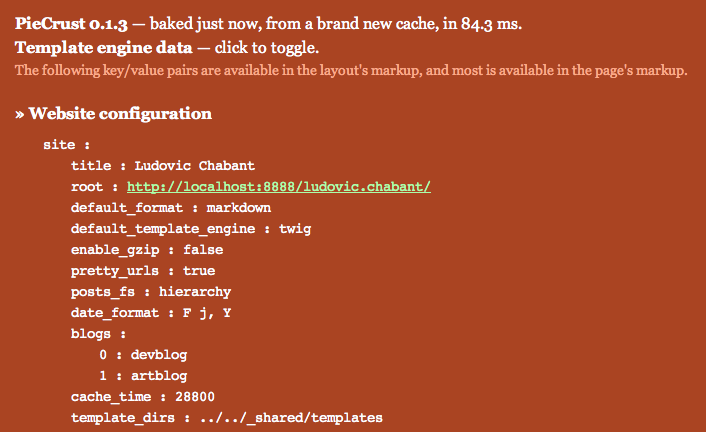
There’s a new experimental feature (meaning: only in the new default branch) that makes the debug window more useful. The debug window is a little known PieCrust feature that used to only show you some caching and performance information on the bottom right corner of your website. But now you’ll notice a second line about “template engine data”:

If you click on it, you will see all the template variables exposed for the page you’re currently viewing.

Not only is it useful for troubleshooting things, but it’s also a great learning tool. Tell me what you think!


PieCrust code changes

There’s been some big changes in the PieCrust codebase recently: some refactoring to make unit-testing easier, the creation of a second branch, and the creation of a satellite repository for the application’s code alone.

You won’t care much about the first one (the refactoring) although you may have to expect a whole bunch of new bugs, which will hopefully be easy to test and fix since the whole point of this refactoring is to make testing easier. The other changes are important, however:

  • There’s a new stable branch which will, well, be kept as stable as possible. This means that new features introduced in the default branch will stay there for a little while until they’re merged into stable. This branching policy is simple yet quite common, as explained by Steve Losh.

  • The "PieCrust Sample" repository now contains the partial history of the main repository. Yeah, I’ve decided to read the Mercurial documentation and found that the hg convert command is pretty useful in this case.

  • The new "PieCrust App" repository contains only the PieCrust app’s code in the root directory. This is useful if you want to include it as a sub-repository of your website’s repository – e.g. in a _piecrust directory. This way, you don’t need mix the PieCrust files with your own, and you can easily update by pulling the sub-repo. This one is also mirrored on GitHub in case you don’t want a Mercurial sub-repo for some reason.